
Given the mountain of applications that we use today, having them together and logging in to each of them can be a hassle. However, a well-designed SSO architecture comes to your rescue increasing productivity and simplifying your daily worklife.
This blog aims to unfold the differences in SSO architecture, with a focus on SSO protocols like SAML, OAuth, as well as architecture diagrams, integrations, challenges, and best practices that expert teams are already using. Regardless of the industry your organization belongs to, security should remain non-negotiable and that’s where high-quality SSO solutions like miniOrange come into play.
What is SSO Architecture?
With a single sign-on (SSO) architecture, users may log in to many apps with just one set of login information. SSO authenticates users once and securely sends that information to all connected systems, so consumers don't have to remember various identities and passwords for each app.
In today's Identity and Access Management (IAM), SSO is essential for making things easier for users and making security stronger. As businesses use more cloud services, enterprise apps, and microservices, the requirement for easy and centralized authentication develops. SSO architecture makes that unified access layer, which keeps users productive and IT teams in charge. It cuts down on password fatigue, lowers the dangers of logging in, and makes sure that all systems are compliant.
If you want to have a secure and easy-to-use IAM strategy, the first step is to learn about SSO architecture. This is true whether you're managing a lot of SaaS platforms or scaling digital identities across hybrid infrastructures.
What is Single Sign-On (SSO)?
Single Sign-On (SSO) enables users to authenticate into various applications through a single authentication process that uses their existing login information. Users do not need to remember or enter different passwords for each application when they use SSO. It provides users with secure single login access to all their authorized systems.
How SSO Works at a High Level
SSO functions as a secure connection point that enables users to access their linked applications. SSO uses an identity provider (IdP) to authenticate user identities, which generates secure tokens after users finish their initial login process. The token that the IdP provides to users enables them to access different integrated applications without needing to authenticate again. It uses SAML and OAuth and OpenID Connect secure protocols to authenticate users through identity verification without revealing their passwords.
Login vs Authentication vs Authorization
The three terms share common ground but they function independently to achieve their respective purposes.
The process of entering authentication details to obtain system access is known as login.
It requires authentication to verify that users possess the identity information they have entered.
The authorization mechanism of SSO determines which actions and resources authenticated users can access.
SSO enables users to access multiple applications through a single authentication process, which does not affect their authorization permissions. The authentication process allows users to access authorized system areas through defined policies, which offer both user-friendly access and security benefits to SSO.
Core Components of SSO Architecture
The authentication process of Single Sign-On (SSO) depends on multiple secure components that verify users before granting them access to systems. Understanding these core components helps you build an SSO solution that scales efficiently while maintaining reliability.
User (Employee / Partner / Customer)
The user refers to either an individual or a non-human identity that is attempting to access an application or service. SSO authenticates users during their initial login and then allows seamless access to multiple connected applications through a single authentication process. This approach enhances convenience and boosts productivity.
Identity Provider (IdP)
The Identity Provider functions as the main authentication center that verifies users. It authenticates user credentials, manages identities, and issues secure tokens that confirm authentication. Common Identity Providers (IdPs) include miniOrange, Okta, and Azure AD. The IdP serves as the trust anchor, enabling all SSO operations.
Service Provider / Application (SP)
The service provider represents the application or platform users want to access (such as Salesforce or Slack). The SP processes login requests through the IdP, verifies the returned token, and then grants access without requiring separate credentials.
Authentication Protocols (SAML, OAuth, OIDC)
These protocols define how authentication data is securely exchanged between the IdP and SP.
- SAML provides secure token-based login functionality, primarily for enterprise and web-based platforms.
- OAuth enables safe authorization delegation for API access.
- OIDC extends OAuth capabilities to provide user identity information for modern web and mobile applications.
Selecting the right protocol ensures an SSO integration that balances efficiency and security.
Directory / User Identities
The directory or user store contains all user information, including credentials, roles, and attributes. It can be an on-premises directory like Active Directory or a cloud-based identity source. The IdP authenticates users through this directory while enforcing consistent access controls across applications.
SSO Architecture Diagram
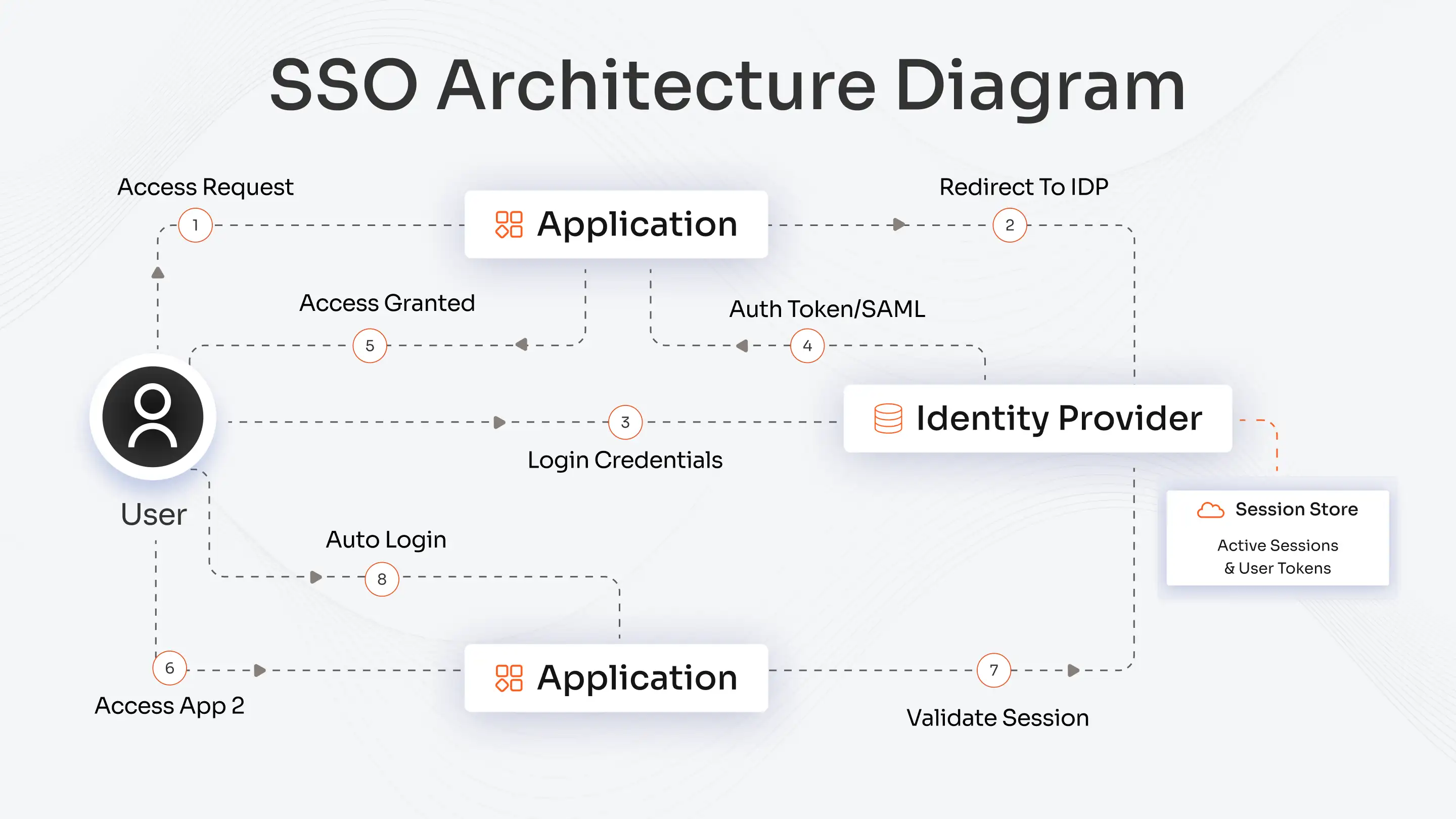
Step-by-step Working of SSO Architecture
The SSO architecture enables users to authenticate once, granting them airtight access to the required applications. The following sequence describes the complete process from login to session management.
1. User Requests Access
The user attempts to access an application. The application redirects the user for identity verification at a single Identity Provider (IdP), which serves as the centralized authentication system.
2. Authentication at the IdP
The IdP authenticates user identity through its stored authentication data or its multi-factor authentication (MFA) system. The authentication system allows authorized users to advance through the process.
3. Token or Assertion Generation
The IdP verifies the request successfully before it produces a security token or assertion, which includes SAML, OIDC, or JWT. The token contains verified identity data, which applications can use for trust purposes.
4. Access Granted to Applications
The token is returned to the Service Provider (SP). The SP then confirms user identity with the IdP through a single authentication process, which prevents users from needing to log in again.
5. Session Management
The IdP manages the user’s active session across connected applications. The user can move between integrated applications without needing to authenticate again because the session remains active.
SSO architecture enables users to perform fast and secure and user-friendly login operations that simultaneously protect all organizational systems from identity threats.
Types of SSO Architecture
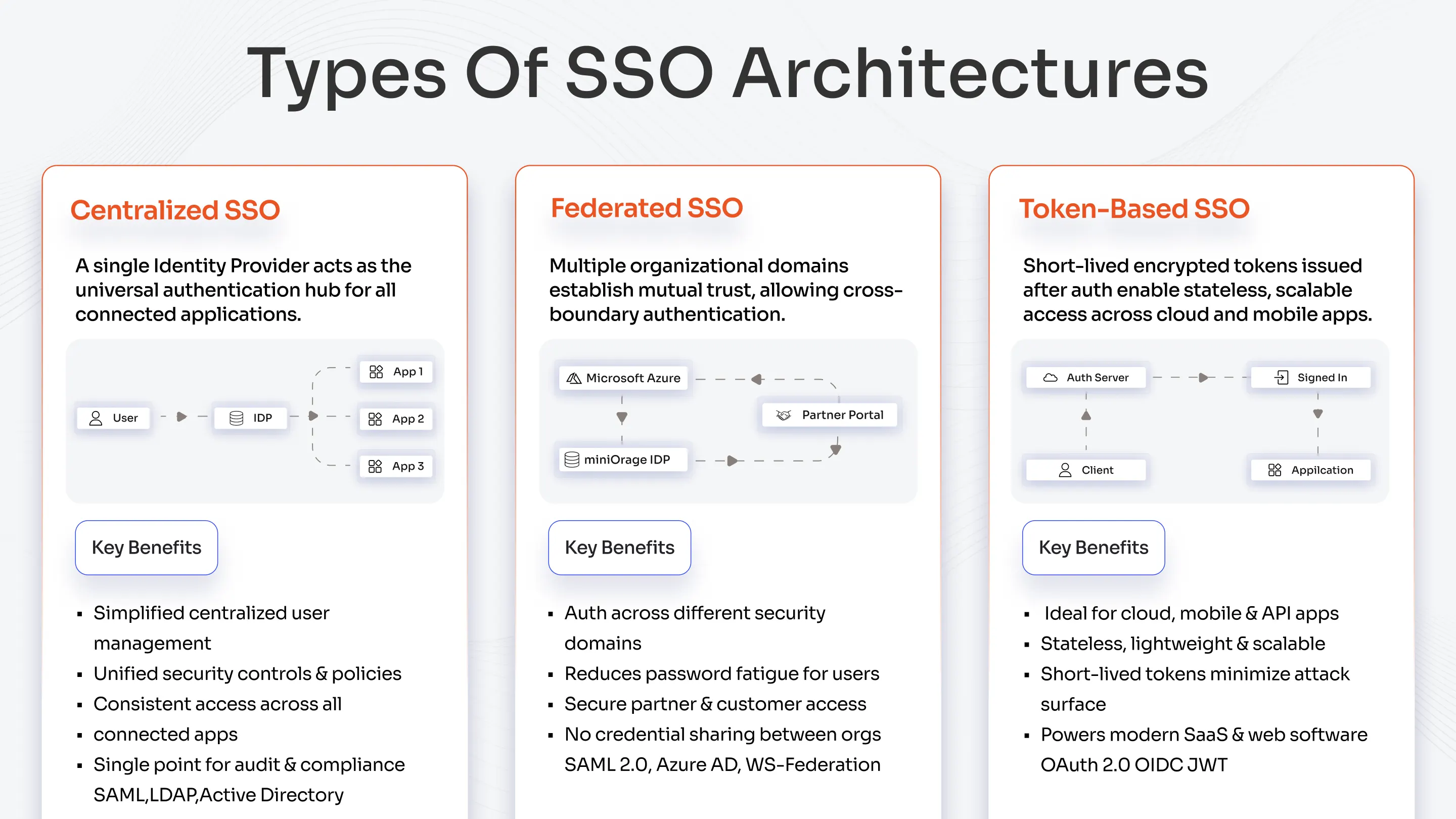
Single Sign-On (SSO) functions through different architectures, which establish how user identities connect to application systems. Each architecture supports different business, security, and scalability requirements.
Centralized SSO Architecture
A centralized SSO setup operates through one Identity Provider (IdP), which provides authentication services to all applications that need to connect.
How it works:
The IdP performs user credential verification as part of a single authentication procedure.
It issues tokens that let users automatically access other applications by authorizing their access.
All authentication decisions flow through one central point.
Key benefits:
- Simplified user management.
- Stronger, unified security controls.
- Ensures users can access all connected apps continuously through consistent availability.
Watch out:
If the IdP fails, access to all applications is blocked, so organizations need to implement redundancy.
Federated SSO Architecture
The authentication framework of federated SSO enables different organizational domains to join a secure authentication network.
How it works:
- It allows different identity systems to trust each other through SAML and WS-Federation protocol implementation.
- External identity providers, including Google, Azure AD, and Okta, authenticate user identities.
- Users perform a single login to access multiple partner or customer portals.
Key benefits:
- Facilitates authentication across different security domains.
- Reduces password fatigue by letting users rely on existing accounts.
- Provides secure access for business partners and customers outside your organizational perimeter.
Token-Based SSO Architecture
Token-based SSO relies on modern protocols such as OAuth 2.0 and OpenID Connect (OIDC) to issue short-lived tokens after successful authentication.
How it works:
- The IdP authenticates the user.
- It produces an encrypted token that developers can use in their applications.
- Applications validate the token to authenticate users without requiring additional credential entry.
Key benefits:
- Works best for cloud, mobile, or API-based applications.
- Offers lightweight design, scalability, and fast performance.
- Serves as a core component driving modern SaaS and web-based software.
IAM and SSO Combined Architecture
A modern IAM architecture uses Single Sign-On (SSO) as its main entry point, which enables users to access all systems through a single secure authentication layer. IAM uses this single identity to control access and enforce policies and governance rules for all applications.
How SSO Fits into the IAM Ecosystem?
- The SSO authentication process verifies users only once before it sends their authenticated identity to all linked applications.
- IAM operates in the background to handle identity management, role assignments, and permission control for all applications.
- Both layers work together to verify users while reducing password changes and maintaining strong security.
Integration with User Lifecycle Management
- IAM updates access automatically whenever HR or IT teams create, modify, or deactivate user accounts.
- New users gain access to their required applications immediately, while leaving users lose access through a single coordinated operation.
- This automation decreases human error and keeps access data accurate and up-to-date.
Integration with Multi-Factor Authentication (MFA)
MFA adds an additional authentication step to the initial SSO login.
Users complete MFA once before they access multiple applications through a single authentication process.
Administrators enforce adaptive MFA policies based on user risk, device, and location criteria.
Integration with Access Governance
- IAM provides a single interface that displays all application access events and their timestamps.
- Security and compliance teams use this data to run access reviews and to approve or revoke access as needed.
- Together, SSO and IAM create traceable audit paths that support both internal and external audit requirements.
Security and Compliance Benefits
- Centralized authentication reduces password reuse and lowers phishing risk.
- Automated provisioning and deprovisioning enforce least privilege as a built-in security control.
- Organizations meet ISO 27001 and SOC 2 requirements more easily through unified policies and logging.
- This combined approach delivers a protected, low-friction login experience across the entire environment.
Benefits of a Well-Designed SSO Architecture
A well-designed Single Sign-On (SSO) architecture enables organizations to manage identities effectively, strengthen security, and boost employee productivity.
- Improved user experience: SSO allows users to access all authorized applications through a single secure login, significantly reducing friction and improving user interaction.
- Reduced password fatigue: Fewer passwords mean fewer reset requests, lower password-related security risks, and less dependence on IT support. This efficiency helps IT teams work smarter while users stay focused.
- Centralized access control: SSO provides complete visibility into IT operations along with centralized policy management across all applications. It simplifies resource management, strengthens security oversight, and supports compliance with frameworks like GDPR and SOC 2.
- Enhanced security posture: By integrating MFA and risk-based authentication, SSO defends against unauthorized access. Unified identity controls reduce security gaps and help organizations implement zero-trust models effectively.
- Improved compliance and scalability: Centralized logging streamlines audits, while scalable design supports expanding application environments without compromising security or consistency.
- Trust and brand reputation: Reliable, seamless access builds user trust and reinforces the brand’s commitment to strong security practices.
Challenges and Best Practices in SSO Architecture
| Aspect | Challenge | Best Practice | Result |
|---|---|---|---|
| Token Security | Attackers steal or forge SSO tokens to hijack sessions. | Enforce strong phishing-resistant MFA (e.g., FIDO2, biometrics, hardware tokens), use short-lived tokens with JWT signing, and maintain continuous authentication. | Prevents token theft and unauthorized access, ensuring session integrity and user trust. |
| Application Compatibility | SAML and OIDC must work across diverse applications and tech stacks. | Adopt trusted standards (SAML, OIDC, SCIM), use middleware adapters, and apply federated identity integration. | Enables smooth interoperability, reducing integration complexity and operational overhead. |
| Session Timeout Management | Users face unexpected logouts that hurt productivity. | Monitor sessions and audit logs, employ risk-based timeout policies, and apply zero-trust models as per NIST. | Balances security and user experience, minimizing session drops while preventing overlong exposures. |
| Legacy Application Integration | Older apps lack modern APIs or SSO headers, limiting compatibility. | Use proxy agents or header-based authentication, and centralize identity management. | Enables secure access for legacy systems, extending SSO benefits without major code changes. |
| User Provisioning | Access delays occur due to unsynced directories and manual provisioning. | Automate with SCIM and Just-In-Time (JIT) synchronization. | Achieves instant user access, reducing admin workload and improving onboarding efficiency. |
| Scalability and Performance | High traffic overwhelms SSO gateways, causing slowdowns or failures. | Build a cloud-native, auto-scaling SSO system (Kubernetes, load balancing, redundant IdPs). | Ensures high availability and reliability, maintaining performance under peak loads. |
| Compliance and Auditing | Difficulty demonstrating SSO controls for regulations (GDPR, SOC 2, HIPAA). | Use centralized logging, SIEM integration, and automated compliance reporting; perform regular security tests. | Simplifies audit readiness and strengthens regulatory compliance posture. |
When Should You Implement SSO?
Teams implement SSO as their primary solution when organizations need to provide secure access with effortless expansion and maximum system availability. The SSO architecture contains three main triggers, which consist of application expansion, employees working from home, and organizations needing to follow regulatory requirements.
Growing SaaS Footprint
Teams experience app sprawl when they implement SaaS tools, including Slack and Salesforce, which results in login system problems. SSO allows organizations to manage user authentication through a single interface, which decreases password-related fatigue and enables quick employee onboarding at 40% speed and decreases support ticket requests by 63%.
Remote Workforce
Remote crews become vulnerable to security breaches because their applications use insecure passwords. It enables users to access all applications through a single click using its MFA system, which also provides immediate offboarding functionality and simplified password reset processes. SSO protects both team security and operational efficiency.
Compliance Requirements
Organizations must establish complete security measures and maintain full logging systems according to the three regulations, which include GDPR, HIPAA, and SOC2. Organizations can use SSO to provide access based on user roles while maintaining audit trails and automatic user deactivation, which helps prevent payment of penalties. SSO needs to start its deployment at the beginning to assist organizations in their audit success and establish trust relationships with their clients.
Getting Started with SSO Architecture
A well-designed SSO architecture establishes an access system that provides both security and effortless user access and maintains high performance levels. The authentication system achieves simple authentication through trusted identity providers, which work with SAML and OAuth and OpenID Connect authentication protocols to reduce password-related fatigue and maintain regulatory compliance. The system requires users to choose their necessary applications before they start monitoring system performance while they progressively introduce additional applications. A correctly designed SSO system delivers security enhancements that create better user interactions and maintain business operational freedom.
Consult IAM experts for your organization’s requirements of single sign-on logins for any sector or industry. Deploy customized login experiences with the help of a solid security-centric SSO solution from miniOrange.
Leave a Comment