

You open an app on a new device, enter your email address, and receive a sign-in link in your inbox. One click later, you're logged in, no password to remember, no OTP to type, and no account recovery process to navigate.
This login experience, known as Magic Link authentication, is becoming increasingly popular across SaaS applications, e-commerce platforms, customer portals, and internal business tools. Instead of relying on passwords, Magic Links verify a user's identity through a secure, time-limited link delivered via email.
In this guide, you'll learn what Magic Link authentication is, how Magic Link login works, its benefits and security considerations, and how it compares with passwords, OTPs, passkeys, and other passwordless authentication methods.
TL;DR
- Magic Link authentication allows users to sign in using a secure link sent to their email.
- It is a passwordless authentication method that eliminates the need to create and remember passwords.
- Magic Links use one-time, time-limited tokens to verify a user's identity.
- Businesses use Magic Link login to simplify onboarding and reduce password-related friction.
- Magic Links offer convenience, while passkeys and FIDO2 provide stronger phishing resistance for high-security use cases.
What Is Magic Link Authentication?
| Traditional Login | Magic Link Login |
|---|---|
| Enter a username and password | Enter your email address |
| Remember and manage credentials | Click a sign-in link |
| Reset forgotten passwords | No password required |
| Authenticate with stored credentials | Authenticate through email verification |
At its core, Magic Link authentication is a passwordless authentication method that allows users to sign in by clicking a secure, time-limited link sent to their email address. Instead of relying on passwords, the system verifies that the user has access to the email account associated with their identity.
A Magic Link is essentially a one-time authentication URL that logs users in with a single click. Once the link is opened and verified, the application creates an authenticated session and grants access.
Unlike traditional logins, which depend on users creating, remembering, and protecting passwords, Magic Link login removes passwords from the authentication process altogether. This reduces login friction and eliminates common challenges such as password fatigue, forgotten credentials, and repeated password resets.
Magic Links are part of the broader passwordless authentication ecosystem, alongside methods such as passkeys, biometrics, FIDO2 security keys, and one-time passcodes (OTPs). While each approach verifies identity differently, they all share the same goal: making authentication simpler and more secure without relying on passwords.
The Password Problem Businesses Are Trying to Solve
Passwords have been the default authentication method for decades, but they were never designed for today's digital world. Employees switch between dozens of work applications, while customers expect instant access to websites, apps, and online services. As the number of accounts grows, passwords create both security risks and user friction.
Businesses today face several password-related challenges:
- Password fatigue: Users struggle to create and remember unique passwords for every account.
- Password reuse: The same credentials are often used across multiple applications, increasing the impact of a breach.
- Credential stuffing: Attackers use leaked usernames and passwords to gain unauthorized access.
- Rising support costs: Password reset requests consume valuable IT and helpdesk resources.
- User drop-offs: Lengthy sign-up and login processes can hurt customer conversions.
Ask yourself:
- How many passwords does the average employee manage every day?
- How often do customers abandon registration flows because they're too complicated?
- How much time does your IT team spend handling password resets?
To address these challenges, organizations are increasingly adopting passwordless authentication methods that simplify login experiences while reducing their dependence on passwords. Magic Link authentication is one of the most popular passwordless authentication.
How Does Magic Link Authentication Work?
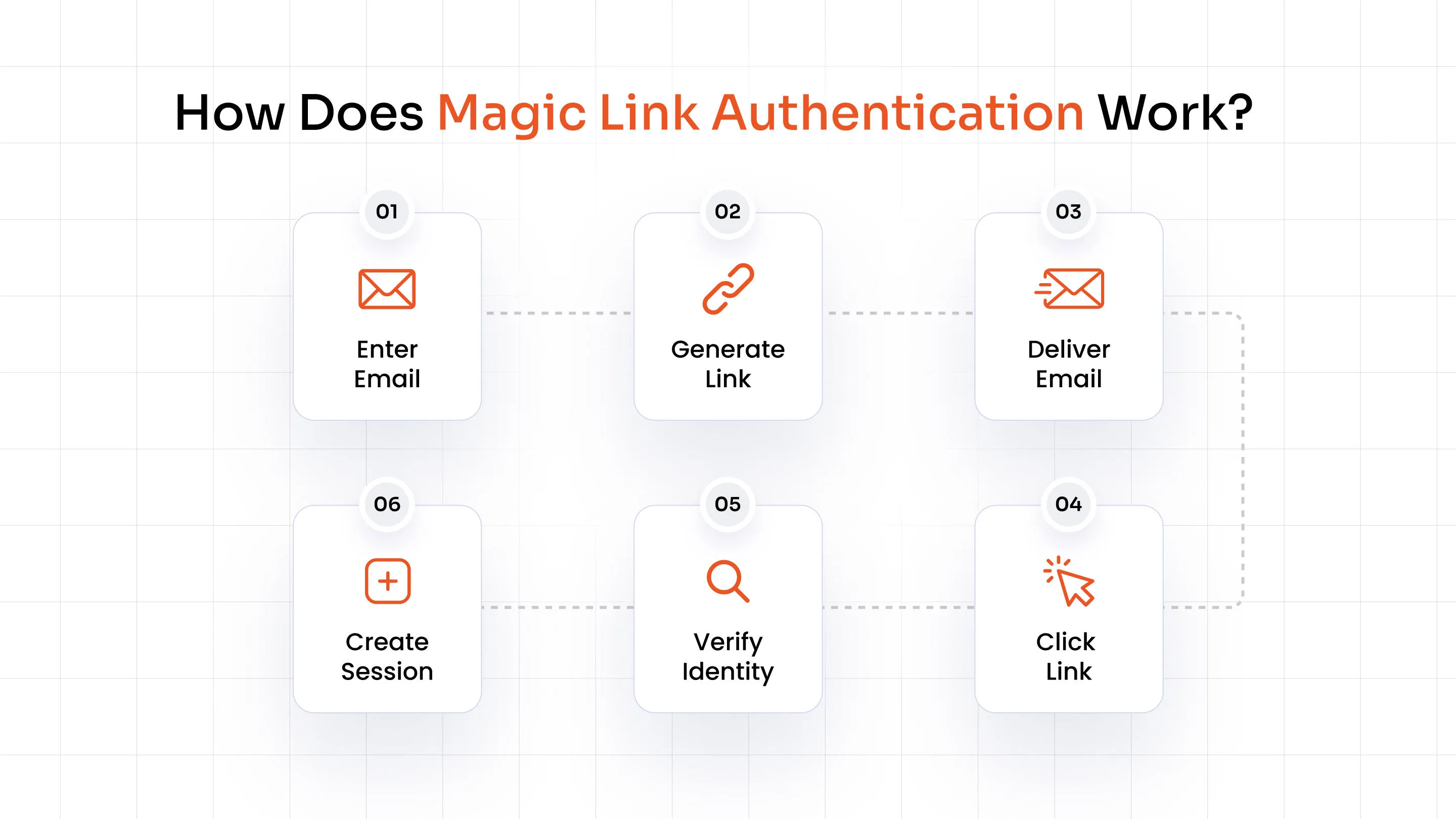
Magic Link authentication works by sending a unique, time-limited sign-in link to a user's email address. Once the user clicks the link, the system verifies their identity and creates an authenticated session without requiring a password. This allows users to sign in with a single click while reducing their reliance on traditional credentials.
Workflow: Enter Email → Generate Link → Deliver Email → Click Link → Verify Identity → Create Session
Step 1: User Requests Login
The user enters their email address on the application's login page and selects "Continue" or "Send Magic Link." The system first checks whether the email address is associated with a valid account before proceeding with the authentication request.
Step 2: A Secure Magic Link Is Generated
The authentication system generates a cryptographically secure, time-limited token and embeds it into a unique login URL. To reduce the risk of misuse, the link is typically valid for only a few minutes and can be used only once.
Step 3: The Link Is Delivered via Email
The Magic Link is sent to the user's registered email address through an email service provider. Since access to the inbox is required to open the link, email ownership becomes the primary method of identity verification.
Step 4: The User Clicks the Link
When the user opens the email and clicks the link, the application validates the token, checks whether it has expired, and ensures that it has not been used previously.
Step 5: Identity Verification and Session Creation
Once the token is verified, the system authenticates the user, creates a secure session, and grants access to the application. Depending on the organization's security policies, additional checks such as device verification or adaptive authentication may also be performed.
This one-click workflow is what makes Magic Link login a popular passwordless authentication method for SaaS platforms, customer portals, and consumer applications.
Core Components Behind Magic Link Authentication
Magic Link authentication may seem as simple as clicking a link in an email, but several components work together behind the scenes to verify identities and protect the login process. From generating secure tokens to managing user sessions, each element plays a critical role in delivering a secure passwordless experience.
Email Identity Verification
Magic Link authentication uses email ownership as the primary method of identity verification. When users request a Magic Link login, the system sends the authentication link only to the email address associated with their account. Access to that inbox acts as proof of identity, eliminating the need for passwords.
Secure Authentication Tokens
Every Magic Link contains a unique, cryptographically generated token embedded within the URL. This token helps the application verify that the login request is legitimate and belongs to the correct user. Since each token is randomly generated, it is extremely difficult to predict or replicate.
Token Expiration
Magic Links are designed to remain valid only for a limited time, typically ranging from a few minutes to an hour. Short expiration windows reduce the risk of unauthorized access if the link is accidentally exposed or intercepted. Once the link expires, users must request a new one.
One-Time Use Links
Most Magic Links can only be used once. After the user successfully logs in, the authentication system invalidates the link, preventing it from being reused. This one-time-use approach helps protect against replay attacks and unauthorized access attempts.
Session Management
After the token is verified, the application creates a secure session and grants the user access to the requested resource. Depending on the organization's security policies, sessions may automatically expire after a period of inactivity or require additional verification for sensitive actions.
Benefits of Magic Link Authentication
Magic Link authentication offers advantages for both users and businesses. By replacing passwords with secure, one-click login links, organizations can simplify authentication, reduce operational overhead, and deliver a smoother sign-in experience.
For users, the biggest benefit is convenience. For businesses, the value extends far beyond that, from lowering support costs to improving security and onboarding.
| Benefit | Business Impact |
|---|---|
| No passwords | Eliminates password reset requests, reduces helpdesk tickets, and removes the costs associated with password management and account recovery. |
| Faster login | Enables users to access applications in seconds, reducing sign-in friction and improving engagement across websites and applications. |
| Easy onboarding | Allows new users to create accounts and start using a product without lengthy registration flows, helping businesses accelerate user adoption. |
| Higher conversion rates | Simplifies sign-up and checkout experiences, reducing abandonment rates and increasing the likelihood of users completing the process. |
| Reduced credential theft | Removes the risks associated with weak and reused passwords, helping organizations defend against credential-stuffing and account takeover attacks. |
| Better accessibility | Delivers a consistent login experience across devices and browsers, making authentication easier for users with different technical skill levels. |
Magic Link login also improves operational efficiency. IT teams spend less time handling password resets, while businesses can focus on delivering better digital experiences instead of managing credentials.
For SaaS platforms, customer portals, and online services, Magic Link authentication provides a practical balance between usability, security, and scalability.
Is Magic Link Authentication Secure?
Yes, Magic Link authentication is secure, but like any authentication method, its security depends on how it is implemented. Magic Links eliminate many of the risks associated with passwords, such as credential theft and password reuse, but they also introduce new considerations around email security and session management.
What makes Magic Links secure?
- No password database: Since users don't create passwords, organizations don't need to store password hashes that could be stolen in a data breach.
- One-time tokens: Every Magic Link contains a unique token that becomes invalid after a successful login, preventing unauthorized reuse.
- Short-lived links and sessions: Most Magic Links expire within a few minutes, limiting the time window for attackers.
- Lower credential-stuffing risk: Attackers cannot use leaked usernames and passwords because the authentication process doesn't rely on static credentials.
Where can things go wrong?
- Email compromise: If an attacker gains access to a user's inbox, they may be able to access Magic Links.
- Link forwarding: Users can accidentally share or forward authentication links to others.
- Session hijacking: Stolen session cookies can allow attackers to impersonate users.
- Phishing attacks: Fake login emails may trick users into clicking malicious links as part of a phishing attack.
- Shared devices: Leaving sessions active on public or shared devices can expose accounts.
How organizations reduce these risks
Organizations can strengthen Magic Link authentication by using short expiration times, device binding, session monitoring, and additional authentication factors for sensitive actions. Many businesses also combine Magic Links with an adaptive MFA solution and risk-based authentication to add another layer of protection.
Magic Links vs Other Authentication Methods
Different authentication methods solve different problems. While Magic Links offer convenience and simplicity, passkeys and FIDO2 security keys provide stronger phishing resistance as part of a strong phishing-resistant MFA solution for high-security environments.
| Feature | Passwords | OTP | Magic Link | Passkeys | FIDO2 Keys |
|---|---|---|---|---|---|
| Passwordless | ❌ | ✓ | ✓ | ✓ | ✓ |
| Phishing resistance | Low | Medium | Medium | High | High |
| User experience | Medium | Medium | High | High | Medium |
| Setup effort | Low | Medium | Low | Medium | High |
| Enterprise readiness | Medium | High | High | High | High |
Which authentication method should you choose?
- Choose OTPs when you need simple account verification or transaction confirmation.
- Choose Magic Links when convenience, quick onboarding, and reduced login friction are the top priorities.
- Choose Passkeys when you need a passwordless experience with strong phishing resistance.
- Choose FIDO2 security keys for privileged accounts, highly regulated industries, and Zero Trust environments.
There is no single authentication method that works for every use case. Customer-facing applications and SaaS products often prioritize usability and conversion, making Magic Link login an attractive option. On the other hand, enterprises protecting administrative accounts or sensitive systems may prefer passkeys or hardware-backed FIDO2 authentication.
The right choice ultimately depends on your security requirements, user experience goals, and deployment environment.
Business Use Cases for Magic Link Authentication
Magic Link login is designed to reduce friction, simplify onboarding, and eliminate the need for passwords. While it isn't the right fit for every scenario, it works particularly well in environments where convenience and user experience are priorities.
Customer Portals
Customer portals often prioritize ease of access. Magic Links allow users to log in quickly without creating or remembering passwords, reducing support requests and improving satisfaction.
SaaS Applications
For SaaS platforms, a smooth onboarding experience can directly impact user adoption. Magic Link authentication enables users to access applications with a single click, helping businesses reduce drop-offs during sign-up.
E-commerce Checkout
Long registration forms can lead to cart abandonment. Magic Links simplify the checkout experience by allowing customers to authenticate instantly and complete purchases faster.
Healthcare Portals
Patients frequently access appointment details, prescriptions, and medical records online. Magic Links provide a convenient way to verify identities without adding unnecessary complexity.
Financial Services
Banks and financial institutions often use Magic Links for low-risk activities such as account activation, transaction notifications, and customer communication.
Temporary User Access and Internal Applications
Organizations can use Magic Links to grant short-term access to contractors, partners, and employees without requiring permanent credentials.
When Should You Choose Magic Links?
Magic Links are one of several passwordless authentication methods available today. The right choice depends on your users, security requirements, and the type of application you're protecting.
Choose Magic Links if:
- You manage customer-facing applications or self-service portals.
- Email is the primary identifier for your users.
- You want frictionless onboarding and faster sign-up flows.
- You need to provide temporary or low-risk access.
- User experience and conversion rates are top priorities.
Consider Passkeys or FIDO2 if:
- You protect administrator or privileged accounts.
- You operate in highly regulated industries.
- Your organization follows Zero Trust principles.
- You require strong phishing resistance.
- Users regularly access sensitive systems and data.
Magic Link passwordless authentication excels in scenarios where convenience and simplicity matter most. However, organizations securing critical infrastructure, financial systems, or privileged access should consider stronger authentication methods such as passkeys and FIDO2.
Best Practices for Implementing Magic Link Authentication
A well-designed Magic Link authentication system balances convenience with security. Organizations can strengthen their implementation by following these best practices:
Set short expiration times: Keep authentication links valid for only a few minutes to reduce the risk of misuse.
Allow one-time use only: Invalidate links immediately after a successful login to prevent replay attacks.
Enable rate limiting: Restrict the number of login requests to protect against abuse and automated attacks.
Monitor user sessions: Detect suspicious behavior, unusual locations, and inactive sessions.
Secure email delivery: Use trusted email providers and enforce encryption wherever possible.
Add MFA for sensitive actions: Require an additional authentication factor for account changes or high-risk transactions with an MFA solution.
Provide fallback authentication: Offer backup options such as passkeys, biometrics, or OTPs if users cannot access their email.
Combining these practices with session monitoring and adaptive authentication helps organizations improve both security and user experience.
How miniOrange Supports Passwordless Authentication
Organizations often need multiple authentication methods to support different users and use cases. miniOrange provides a flexible passwordless authentication platform that supports customer identities, workforce access, and enterprise security requirements.
Magic Link Authentication
Enable one-click, passwordless login experiences for customer portals, SaaS applications, and internal tools using secure, time-limited authentication links.
Passkeys and WebAuthn
Replace passwords with phishing-resistant authentication using Passkeys and WebAuthn that works across browsers, devices, and operating systems.
FIDO2 Security Keys and Biometrics
Strengthen security for privileged accounts and sensitive applications using hardware-backed authentication and biometric verification.
Adaptive and Risk-Based Authentication
Continuously evaluate user behavior, location, and device signals to apply additional verification only when necessary.
Single Sign-On (SSO)
Provide users with seamless access to multiple applications through a single set of credentials with an SSO solution.
Workforce and Customer Identity
Support passwordless authentication for employees, contractors, partners, and customers from a centralized identity platform.
With miniOrange, organizations can combine Magic Links with stronger authentication methods such as passkeys, biometrics, and adaptive MFA to deliver secure and seamless login experiences across web, mobile, and enterprise applications.
The Role of Magic Links in Passwordless Security
Magic Link authentication replaces passwords with secure, time-limited links delivered through email, making login faster and more convenient for users. As a passwordless authentication method, it helps organizations reduce password fatigue, lower support costs, and simplify onboarding.
However, Magic Links are not a one-size-fits-all solution. While they work well for customer portals, SaaS applications, and temporary access scenarios, organizations protecting privileged accounts and sensitive systems may benefit from passkeys or FIDO2 security keys. The right authentication strategy depends on your users, security requirements, and business goals.
FAQs
What are the benefits of Magic Link authentication?
Magic Link authentication eliminates passwords, simplifies onboarding, reduces password reset requests, and improves the user experience. It also lowers the risks associated with password reuse and credential-stuffing attacks.
Is Magic Link authentication secure?
Yes. Magic Links use one-time, time-limited tokens and eliminate the need to store passwords. Organizations can further strengthen security with adaptive MFA, device binding, and session monitoring.
What is the difference between Magic Links and OTP authentication?
Magic Links authenticate users through a secure link sent via email, while OTP authentication requires users to enter a temporary code. Magic Links typically offer a faster, one-click login experience.
Can Magic Links replace passwords completely?
For many customer-facing applications, Magic Links can replace passwords entirely. However, organizations securing privileged accounts or sensitive systems may require additional authentication methods.
When should I use Magic Link authentication instead of passkeys?
Choose Magic Links when convenience, onboarding, and user experience are the primary goals. Passkeys are a better choice for environments that require stronger phishing resistance.
Why am I not receiving my Magic Link email, and how can I fix it?
Check your spam folder, verify that you entered the correct email address, and ensure that your organization isn't blocking emails from the sender. If the problem persists, request a new link or contact support.
Leave a Comment