AD Tools
Top Active Directory Security Best Practices
Jul 22, 2025
Need Help? We are right here!

Search Results:
×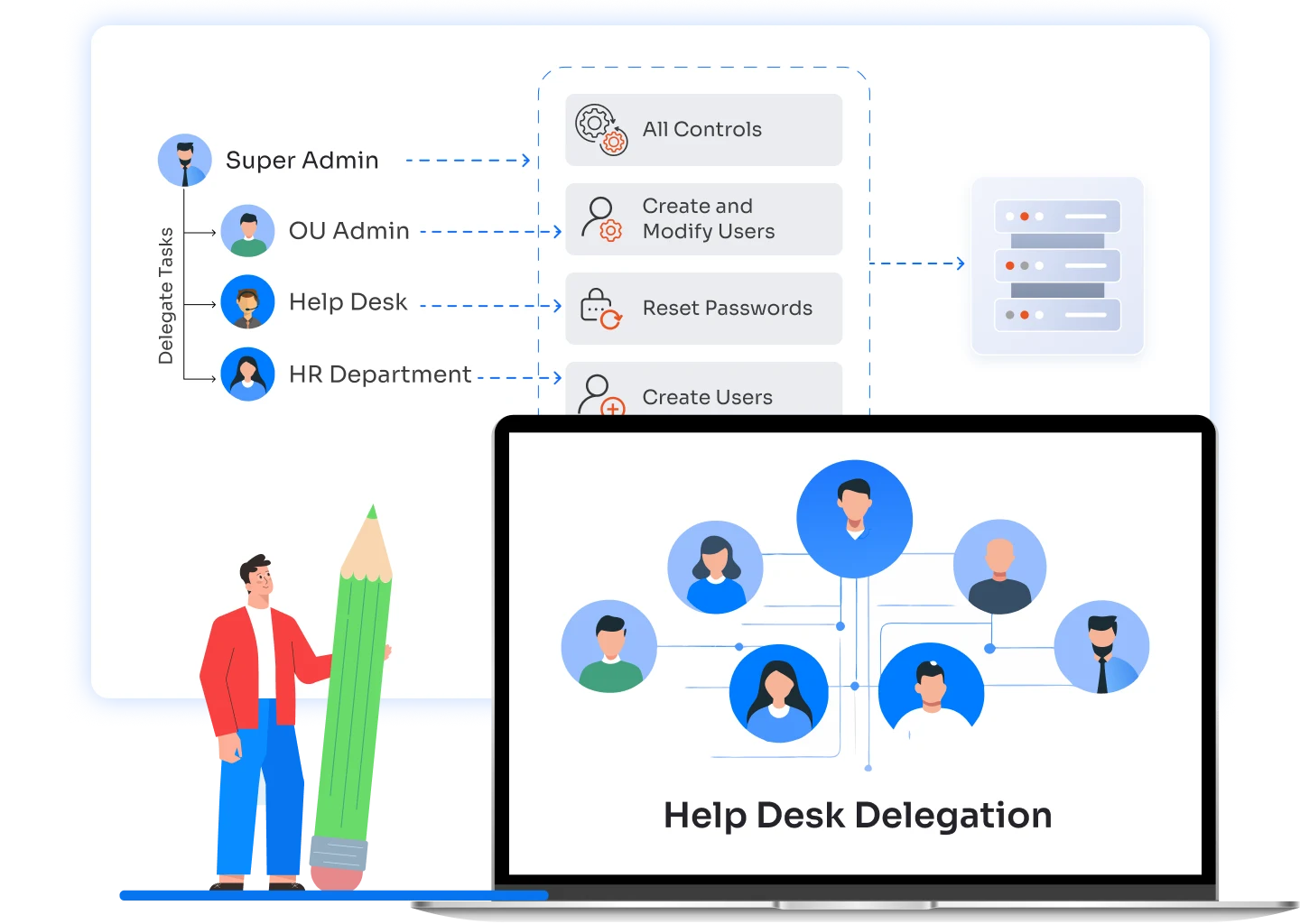
Help desk delegation follows a controlled flow where tasks are assigned by role and scope, not broad admin access. Admins define what actions can be performed and where, while help desk users execute only approved tasks with full audit visibility and permissions.
Not every help desk team needs access to the entire directory. OU-level delegation allows organizations to restrict permissions to specific departments, locations, or business units.
Help desk staff can manage users within assigned OUs without visibility into other parts of Active Directory. This ensures:


Instead of assigning permissions to individuals, delegation can be managed through security or distribution groups. This simplifies access management and reduces ongoing administrative effort.
When a user joins or leaves a help desk group, permissions are automatically applied or revoked. This model supports:
Help desk delegation is most effective when applied to everyday operational tasks. These scenarios show how teams delegate responsibility without increasing risk or admin exposure.

HR and managers often need to onboard users quickly. Delegation allows them to create users within defined OUs or templates without accessing Active Directory admin tools.

Password issues are the most common IT requests. With Active Directory help desk delegation, support teams can reset passwords and unlock accounts without domain admin rights.

Group membership changes impact access across systems. Delegation enables help desk staff to add or remove users from approved groups only.
A unified console to manage Active Directory objects, users, computers, groups, OUs, and GPOs, streamlining workflows and simplifying administration.
Capture a complete log of every delegated action. Know who performed the task, what changed, and when it happened.
Monitor changes to help desk roles and delegated permissions. Detect privilege drift early and maintain least-privilege access.
Get a single view of all delegated permissions across Active Directory. Quickly review who has access and what they can do.
Record login activity and access timing for all help desk users. Identify unusual access patterns before they become security issues.
Receive instant alerts for suspicious actions or policy violations. Respond quickly and prevent misuse of delegated access.

Understand how Active Directory help desk delegation can simplify task ownership without increasing risk. miniOrange shows how roles, scopes, and approvals come together to delegate AD tasks safely and efficiently.
Transform the way you delegate AD tasks with clear control, faster resolution, and built-in accountability.
Active Directory help desk delegation allows IT teams to delegate routine AD tasks to help desk staff using role-based access, while maintaining centralized control and audit visibility.
Domain admin rights provide unrestricted access across the directory. Help desk delegation restricts users to predefined tasks, scopes, and objects, reducing security risk and accidental changes.
Yes. You can delegate control in Active Directory at the OU level, limiting help desk actions to specific departments, locations, or business units.
Yes. Multi-domain delegation allows help desk users to manage assigned domains only, without gaining access to other domains or forest-wide privileges.
Every delegated action is logged with details such as user, task, target object, and timestamp. This supports compliance, investigations, and access reviews.
Yes. Delegated permissions can be updated or revoked in real time, ensuring quick response to role changes, offboarding, or security incidents.