
Government organizations manage sensitive citizen, financial, employee, research, and operational information across increasingly distributed IT environments. Employees may access these resources through cloud applications, VPNs, remote desktops, mobile devices, and web applications. As a result, a stolen password can become a pathway into critical systems.
Multi-factor authentication for the government adds another layer of identity verification before access is granted. By requiring users to present multiple authentication factors, agencies can reduce the risk associated with compromised credentials. For sensitive systems and privileged accounts, phishing-resistant methods such as FIDO2, passkeys, security keys, and smart cards can provide stronger authentication.
What Is Multi-Factor Authentication for the Government?
Multi-factor authentication (MFA) requires users to verify their identity using two or more distinct authentication factors before accessing a protected system, application, or resource.
The three primary factors are:
- Something you know: Password, PIN, or OTP
- Something you have: Smartphone, hardware token, security key, or smart card
- Something you are: Fingerprint, facial recognition, or another biometric
A typical government login can follow this sequence:
Username and password → MFA challenge → Additional factor verified → Access granted
The additional factor means that possession of a password alone should not be enough to access the protected resource.
MFA does not mean every method offers the same protection
This distinction is particularly important when selecting government authentication methods.
Traditional MFA can involve SMS or email OTP, authenticator applications, or push notifications. These methods can strengthen authentication, but they should not automatically be considered phishing-resistant.
Phishing-resistant MFA uses authentication mechanisms designed to prevent attackers from successfully capturing and replaying authentication information through a fraudulent website or similar attack.
For government environments, authentication can therefore be aligned with risk:
- Standard employee access: Authenticator apps, push, or other accessible MFA methods
- Sensitive applications: Stronger authentication policies
- Privileged or high-risk access: FIDO2, passkeys, security keys, or smart cards where appropriate
The supplied brief specifically recommends distinguishing regular MFA from phishing-resistant authentication and giving stronger methods greater consideration for high-risk government access.
Why Do Government Organizations Need MFA?
For MFA for government organizations, the priority is to strengthen authentication around the systems, applications, and data that carry the greatest security risk. A compromised account can expose information or provide access to systems well beyond the user's individual device.
Protect sensitive citizen and government information
Government agencies may store:
- Personally identifiable information (PII)
- Financial records
- Employee information
- Administrative records
- Research data
- Confidential government information
These resources require more than a basic assumption that a username and password are sufficient.
MFA creates another verification checkpoint between the user's identity and the information that identity can access. If a password is compromised, the attacker still needs to satisfy the additional authentication requirement.
Defend against phishing and stolen credentials
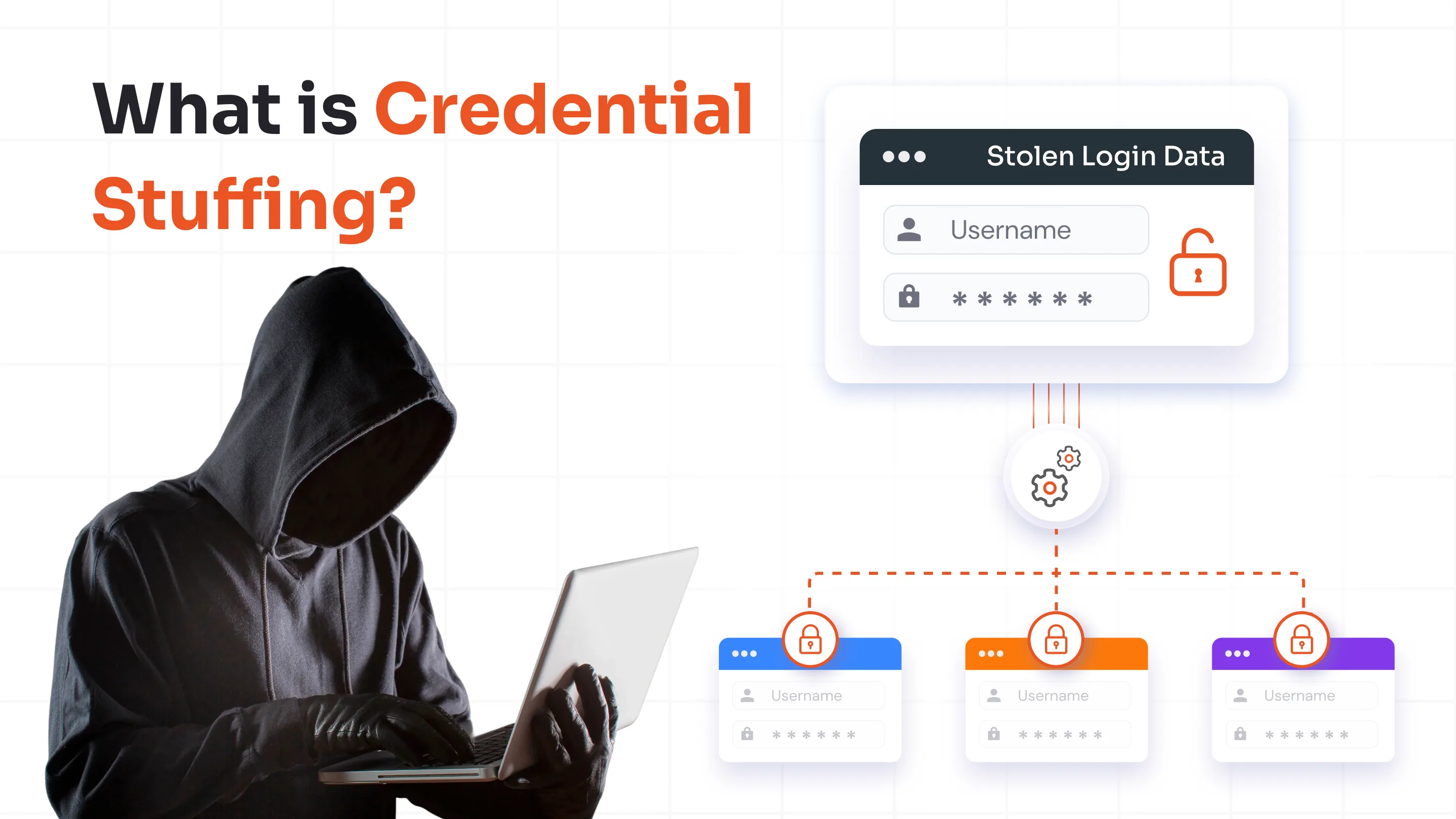
Phishing attacks often attempt to convince employees to disclose credentials through fraudulent login pages, emails, or messages. Credential stuffing can also exploit passwords reused across services.
MFA changes the access process:
Password compromised → Additional verification required → Unauthorized access becomes harder
The protection depends on the authentication method. Standard MFA adds another barrier, while phishing-resistant methods can provide stronger protection against attacks specifically designed to steal authentication credentials.
As part of a broader government cybersecurity MFA strategy, agencies can use stronger authentication controls to reduce the risk of compromised credentials leading to unauthorized access.
Secure remote and mobile access
Government employees increasingly access systems from outside traditional office environments.
Common access paths include:
- VPN
- Remote Desktop/RDP
- Cloud applications
- Virtual desktops
- Web applications
- Mobile devices
Remote access expands the number of places from which users can attempt to reach government resources.
This makes MFA for government agencies particularly important as employees access government resources from remote locations, mobile devices, and distributed work environments.
Protect privileged and administrative accounts
Administrative accounts can have permissions that allow users to manage infrastructure, identities, applications, and security settings.
A government MFA strategy should therefore pay particular attention to:
- System administrators
- Domain administrators
- IT administrators
- Security personnel
- Financial administrators
- Other privileged users
A compromised privileged account can have a substantially larger impact than a compromised standard account. Stronger authentication requirements can help reduce this exposure.
Reduce the impact of account compromise
MFA is not a substitute for endpoint security, network controls, monitoring, access governance, or employee security awareness.
Its specific role is to make compromised credentials less immediately useful.
Even when an attacker obtains a username and password, an additional authentication requirement can prevent the attacker from completing the login process if they cannot satisfy the second factor.
Support government cybersecurity requirements
Government organizations may operate under internal security policies, contractual obligations, cybersecurity frameworks, and other requirements.
MFA can support stronger identity and access controls, but it should not be presented as an automatic path to compliance. Agencies still need to evaluate all applicable requirements and controls.
The supplied source explicitly recommends discussing MFA as support for government security requirements without claiming that MFA by itself makes an organization compliant.
7 MFA Methods Government Organizations Can Use
The most appropriate MFA methods depend on the sensitivity of the resource, the user's role, existing infrastructure, and the required level of authentication assurance.
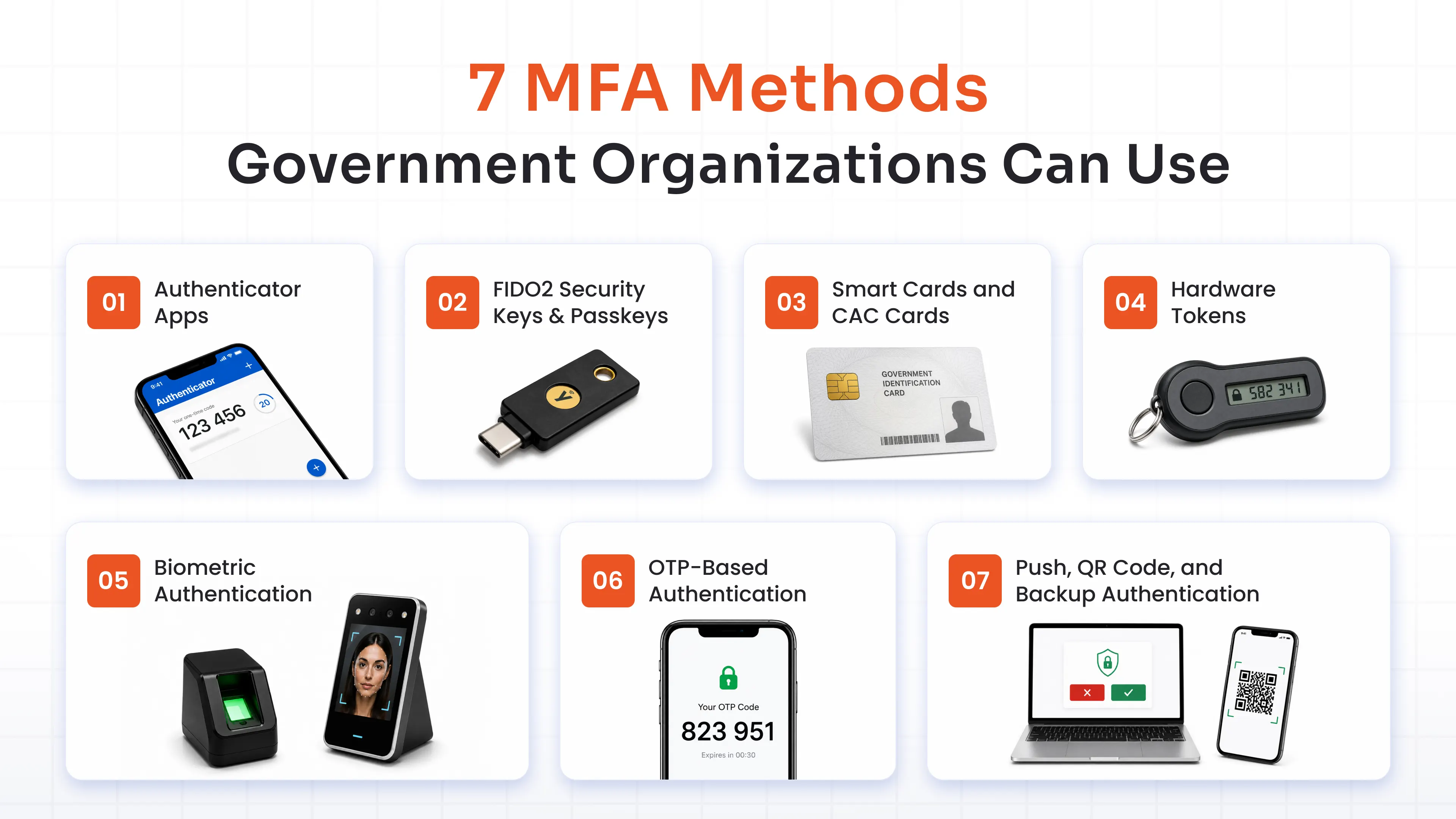
Instead of deploying one method everywhere, government organizations can combine different methods according to risk.
1. Authenticator Apps
Authenticator applications provide mobile-based authentication through OTPs or push notifications.
Examples include:
- Microsoft Authenticator
- Google Authenticator
- miniOrange Authenticator
They are practical for large employee populations because users can authenticate through devices they already use.
Authenticator apps can be particularly useful for standard workforce access, although organizations should distinguish OTP-based authentication from phishing-resistant authentication when establishing policies for high-risk users.
2. FIDO2 Security Keys and Passkeys
FIDO2 security keys and passkeys are among the most important options for a phishing-resistant MFA for the government.
They can support:
- Phishing-resistant authentication
- Passwordless authentication Solution
- Hardware security keys
- Higher-assurance access
These methods are especially relevant for:
- Privileged administrators
- Sensitive government systems
- Financial applications
- Administrative roles
- High-risk remote access
FIDO2 security keys can also provide a dedicated physical authentication factor, while passkeys offer a passwordless approach that can improve both security and usability.
3. Smart Cards and CAC Cards
Smart cards provide certificate-based authentication and can be particularly relevant to established government identity environments.
They can support:
- Certificate-based authentication
- CAC-style use cases
- PIV-style environments
- CAC Card authentication for government and sensitive systems
- Smart Card Authentication for strong authentication and secure access
For organizations already using smart-card infrastructure, this approach can extend MFA without requiring an entirely separate identity model.
4. Hardware Tokens
Hardware tokens provide users with a dedicated physical authentication factor.
Examples include:
- YubiKey
- Display tokens
- Other supported hardware tokens
They can be useful when mobile authentication is impractical, restricted, or undesirable for specific users.
Organizations should evaluate the specific token technology because hardware tokens can differ considerably in the authentication mechanisms they support.
5. Biometric Authentication
Biometric authentication can use:
- Fingerprints
- Facial recognition
- Device-based biometrics
Biometrics authentication can provide a convenient authentication experience and reduce the need for users to remember additional secrets.
They are often most useful when integrated into a broader secure authentication mechanism rather than considered independently of the device or authenticator supporting the biometric verification.
6. OTP-Based Authentication
OTP authentication can be delivered through:
- SMS
- Authenticator applications
Its accessibility makes One-Time Passwords (OTP) useful for broad user populations and situations where dedicated hardware is not practical.
However, organizations should not treat SMS or email OTP as equivalent to phishing-resistant methods.
Higher-risk access may require a stronger approach like Adaptive MFA solution. In it’s true sense, what adaptive MFA does is it verifies users and applies relevant restrictions based on IP, time, location, and device, making sure the right level of access control is applied to the level of risk.
7. Push, QR Code, and Backup Authentication
Push notifications allow users to approve authentication requests through an application, while QR authentication provides another way to complete an authentication workflow.
Backup authentication methods can also help users recover access when their primary authentication device is unavailable.
The objective is to provide flexibility without weakening the organization's authentication requirements.
Selecting the right authentication method
Government organizations can use a simple risk-based model:
- Standard access: Authenticator apps, push, or OTP
- Sensitive access: Stronger MFA policies and higher-assurance methods
- Privileged access: FIDO2, passkeys, security keys, or smart cards where appropriate
The supplied brief specifically recommends differentiating these methods rather than presenting all authentication options as equally secure.
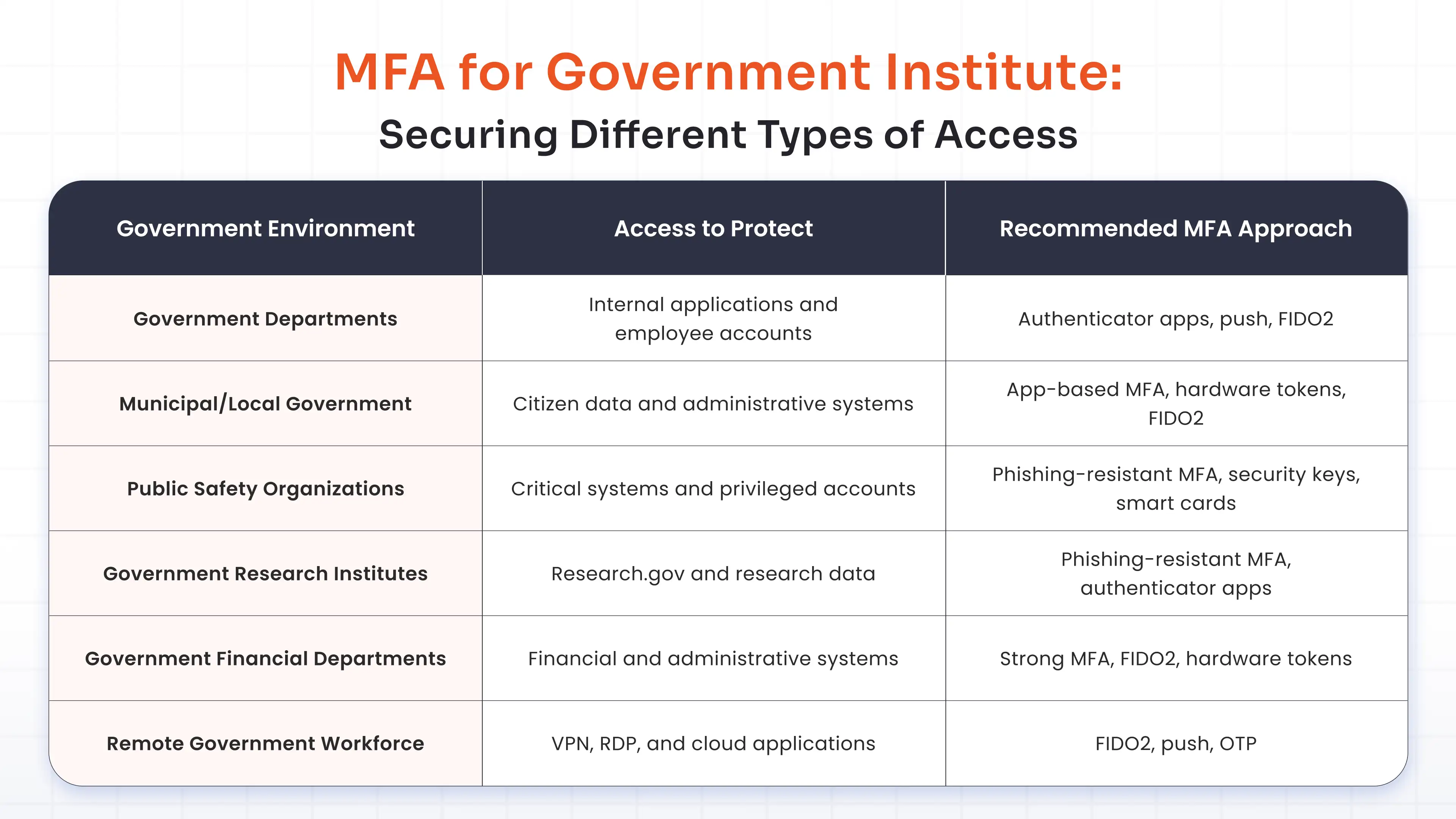
MFA for Government Institute: Securing Different Types of Access
Government institutes can include research organizations, municipal authorities, public safety organizations, financial departments, and other public-sector bodies. Their systems and users do not necessarily carry the same level of risk.
This makes multi-factor authentication for government institute environments a use-case-specific requirement rather than a one-size-fits-all deployment.
Government departments
Government departments may have large employee populations accessing internal applications, employee portals, cloud services, and administrative systems.
Authenticator apps and push authentication can provide accessible MFA for standard users, while FIDO2 can be considered for sensitive or privileged access.
Municipal government
MFA for municipal government environments can help protect citizen information and administrative systems.
Municipal organizations may need to secure:
- Citizen databases
- Employee accounts
- Administrative applications
- Financial systems
- Remote access
The authentication method can then be selected according to the sensitivity of each resource.
Public safety organizations
Public safety organizations can operate critical systems where unauthorized access could have significant operational consequences.
For these environments, government institute cybersecurity policies may place greater emphasis on phishing-resistant MFA, security keys, smart cards, and stronger controls for privileged users.
Government research institutes
Research institutes may handle research data and specialized systems.
The supplied brief uses Research.gov as a practical example: financial and administrative roles are required to use phishing-resistant MFA, while other users may use regular or phishing-resistant MFA solutions.
This illustrates how authentication requirements can be differentiated according to role and risk.
Government financial departments
Financial departments manage systems where unauthorized access can create financial and administrative consequences.
Stronger authentication can therefore be considered for users accessing financial applications, particularly where those users have elevated privileges.
Also read: MFA for Finance and Banking Industry
Remote government workforce
Remote users may access VPNs, RDP environments, cloud applications, and virtual desktops.
MFA adds identity verification to these access pathways and helps organizations maintain consistent authentication controls outside traditional government facilities.
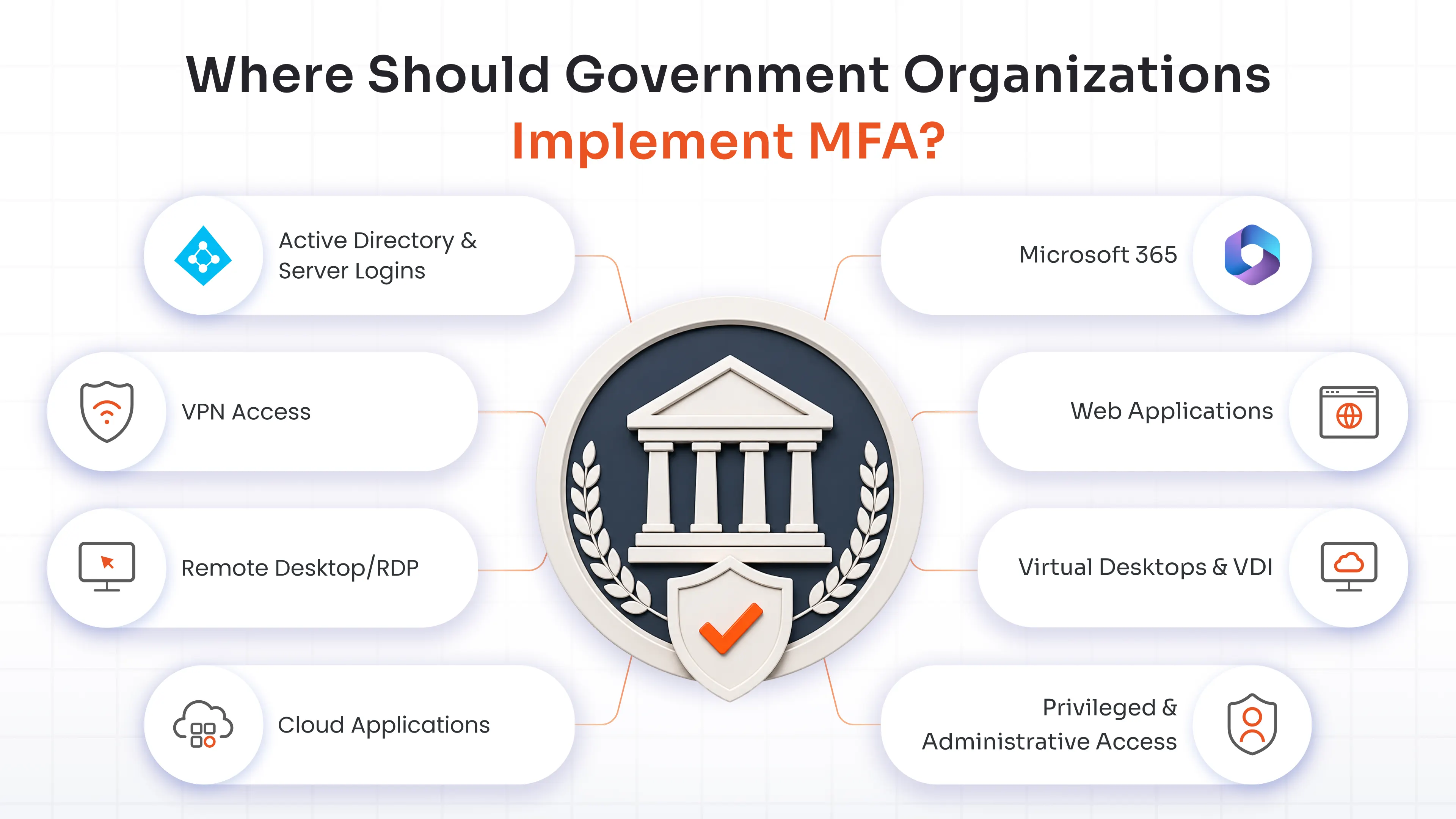
Where Should Government Organizations Implement MFA?
MFA should cover the access points through which users reach important government resources.
Active Directory and server logins
Active Directory and server access can be particularly important because privileged credentials may provide access to multiple systems.
Protecting administrator authentication can help reduce the consequences of directory or infrastructure credential compromise.
VPN access
VPNs provide remote connectivity to protected resources. MFA can require users to verify their identity before establishing that connection.
Remote Desktop/RDP
RDP can provide direct access to desktops and servers. Adding MFA creates an additional verification point before a remote session is established.
Cloud applications
Cloud services have become an important part of government IT environments. MFA can protect cloud accounts that provide access to documents, applications, communications, and other organizational resources.
Microsoft 365
Microsoft 365 accounts can provide access to email, files, collaboration tools, and other business information. MFA helps protect these identities from password-based compromise.
Web applications
Government web applications can expose citizen, financial, research, or administrative information. MFA can strengthen authentication before users reach these resources.
Virtual desktops and VDI
VDI environments centralize access to applications and workspaces. MFA can verify users before they enter the virtual environment.
Privileged and administrative access
Privileged access deserves stronger authentication because these identities can modify systems, permissions, and security controls.
The supplied brief identifies AD and servers, VPN, RDP, cloud applications, Microsoft 365, web applications, VDI, privileged access, and remote workforces as important MFA deployment areas.
How to Implement MFA in a Government Organization?
Implementing MFA across a government organization requires more than selecting an authentication method. Agencies need to account for existing infrastructure, user populations, critical systems, and operational requirements. An enterprise MFA solution can help agencies secure access across applications, systems, and users while adapting to their existing infrastructure.
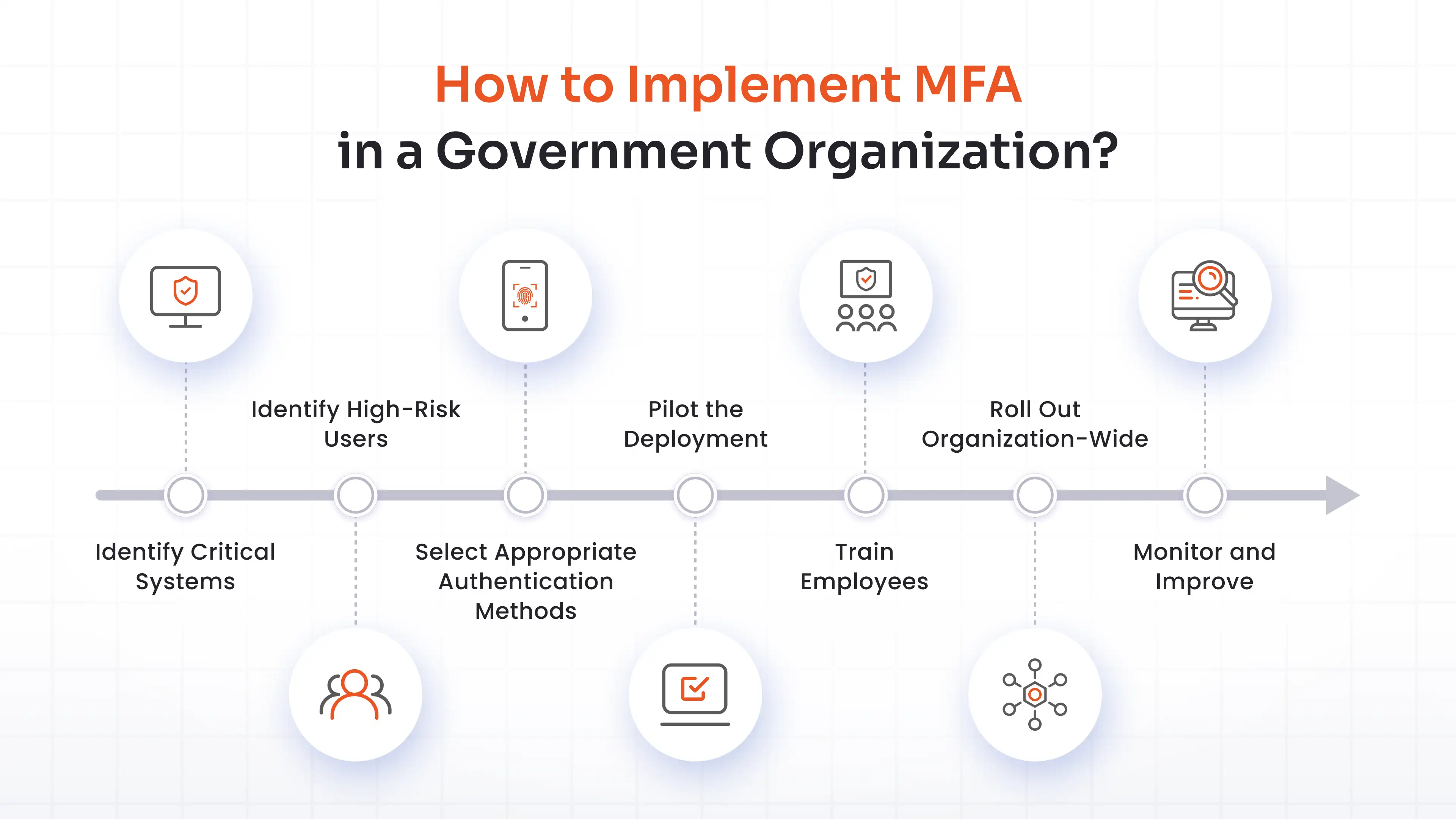
Step 1: Identify critical systems
Begin by identifying the resources where unauthorized access could have the greatest impact.
Prioritize:
- Sensitive citizen information
- Financial systems
- Administrative applications
- Critical infrastructure
- Research systems
- Remote access services
Step 2: Identify high-risk users
Map users according to the level of access they hold.
Give particular attention to:
- Privileged administrators
- Financial users
- Administrative users
- IT personnel
- Remote workers
- Users handling sensitive government information
Step 3: Select appropriate authentication methods
Do not assume every user needs the same authentication method.
Instead, determine whether each group requires standard MFA, stronger MFA, or phishing-resistant authentication.
Step 4: Pilot the deployment
A controlled pilot can expose issues before the organization-wide rollout.
Test:
- Application compatibility
- Device availability
- Authentication workflows
- User experience
- Recovery processes
- Backup authentication
Step 5: Train employees
Employees should understand how MFA works and what to do when authentication fails.
Training should cover:
- Completing authentication requests
- Recognizing suspicious prompts
- Reporting lost devices
- Recovering accounts
- Avoiding approval of unexpected authentication requests
Step 6: Roll out organization-wide
Expand MFA according to the organization's priorities rather than attempting to change every system simultaneously.
A phased rollout can be particularly useful for large government agencies with multiple departments and legacy applications.
Step 7: Monitor and improve
After deployment, security teams should review authentication activity, failures, recovery requests, user feedback, and policy effectiveness.
The supplied implementation guidance follows this same progression: identify systems, identify high-risk users, select methods, pilot, train users, roll out, and monitor.
What to Look for in a Government MFA Solution?
A government MFA solution should fit the organization's security requirements and existing technology environment.
Prioritize phishing-resistant authentication
For privileged users and sensitive systems, evaluate support for:
- FIDO2
- Passkeys
- Security keys
- Smart cards
- Other phishing-resistant mechanisms
Support multiple authentication methods
Government environments contain different users and applications. A suitable platform should provide flexibility across:
- Authenticator apps
- Push
- OTP
- Hardware tokens
- FIDO2
- Passkeys
- Smart cards/CAC cards
Integrate with existing infrastructure
A government organization may need MFA for:
- Active Directory
- Servers
- VPN
- RDP
- Microsoft 365
- Cloud applications
- Web applications
- VDI
Integration with existing infrastructure is therefore critical to avoiding fragmented authentication controls.
Provide centralized administration
Security teams should be able to manage authentication policies and users centrally.
Important administrative capabilities include:
- Policy management
- User management
- Reporting
- Monitoring
- Authentication configuration
- Recovery controls
Support cloud and on-premises deployment
Different government organizations have different infrastructure requirements. Deployment flexibility can make it easier to introduce MFA without requiring a complete infrastructure transformation.
Scale across departments and users
The solution should support expansion across departments, applications, and user populations while maintaining consistent policy enforcement.
Secure Government Access With miniOrange MFA
miniOrange MFA provides multiple authentication methods, including Offline MFA and deployment options for organizations that need to secure different government access environments.
Authentication options
miniOrange supports:
- FIDO2 and passkeys
- Hardware tokens
- Smart cards/CAC cards
- Authenticator applications
- Push notifications
- OTP
- Grid Pattern Matching
This gives government IT teams flexibility to apply authentication methods according to user role and access requirements.
Infrastructure coverage
miniOrange supports MFA across:
- Active Directory and servers
- RDP/Remote Desktop
- VPN
- Microsoft 365
- Cloud applications
- VDI
This allows organizations to extend authentication controls across multiple access points rather than managing completely separate MFA approaches for each environment.
Build authentication around risk
A government organization can use different authentication methods for different scenarios.
For example:
- Standard employees: Authenticator applications or push
- Remote users: Push, OTP, or stronger methods
- Sensitive applications: Stronger MFA policies
- Privileged administrators: FIDO2, passkeys, security keys, or smart cards
- Existing smart-card environments: Smart card/CAC authentication
The supplied product brief specifically identifies these authentication methods and deployment areas as part of the miniOrange MFA offering.
Conclusion
Government organizations need authentication controls that reflect the sensitivity of their systems, the privileges of their users, and the ways employees access resources. Multi-factor authentication for the government adds another identity-verification layer, while phishing-resistant methods can provide stronger protection for privileged and high-risk access.
A risk-based strategy helps agencies choose appropriate methods, secure remote and cloud access, protect critical infrastructure, and integrate MFA with existing systems. With a flexible government MFA solution, agencies and institutes can strengthen authentication without forcing every user or application into the same model.
FAQs
Why is MFA important for government organizations?
MFA adds another identity-verification layer to government systems. If a password is compromised, an attacker must still satisfy the additional authentication requirement, reducing the likelihood that stolen credentials alone will provide unauthorized access.
What is the best MFA method for government organizations?
The best method depends on risk and infrastructure. Authenticator apps can suit standard users, while FIDO2, passkeys, security keys, and smart cards can provide stronger options for privileged users and sensitive government systems.
What MFA methods are commonly used by government organizations?
Common government authentication methods include authenticator applications, OTP, push authentication, QR authentication, hardware tokens, FIDO2 security keys, passkeys, smart cards, CAC cards, and biometric authentication.
Can MFA secure government VPN and remote access?
Yes. MFA can protect VPN, RDP, Remote Desktop, VDI, cloud applications, and other remote access pathways by requiring users to complete additional identity verification before accessing protected resources.
What should government organizations do if employees lose their MFA device?
Organizations should establish secure account-recovery procedures and backup authentication methods. Lost or compromised devices should be reported promptly, disabled when necessary, and replaced according to established organizational security procedures.
How can government organizations prevent MFA from becoming difficult for employees?
Use authentication methods appropriate to each user group, provide practical training, pilot deployments, establish recovery processes, and apply stronger authentication where risk warrants it rather than creating unnecessary friction for every employee.
About the Author

Content Writer
Minal is an experienced B2B content writer. She has written over 250 articles across industries like UI/UX, real estate, automotive, digital marketing, SaaS, AI & ML, and cybersecurity. She brings her interest in cybersecurity to life by creating clear, engaging content tailored for technical, non-technical, and creative pieces. Her aim is to simplify complex topics, highlight product value, and connect with both technical and non-technical audiences.
Leave a Comment