Hello there!
Need Help? We are right here!

Need Help? We are right here!
Search Results:
×
A GPO takes effect on every user or computer in the scope it is linked to. Someone edits a drive-map policy, deletes a lockdown GPO that looked unused, or unlinks a policy from the wrong OU. The result shows up as support tickets, not as an error.
Native recovery depends on a habit. GPMC can back up and restore a GPO by hand. That only helps if someone remembered to take a backup before the change, and it still leaves you writing a Backup-GPO script to keep those copies current.
miniOrange adds GPOs to your scheduled AD backup and restores a single GPO from any backup, with its original links if you want them.
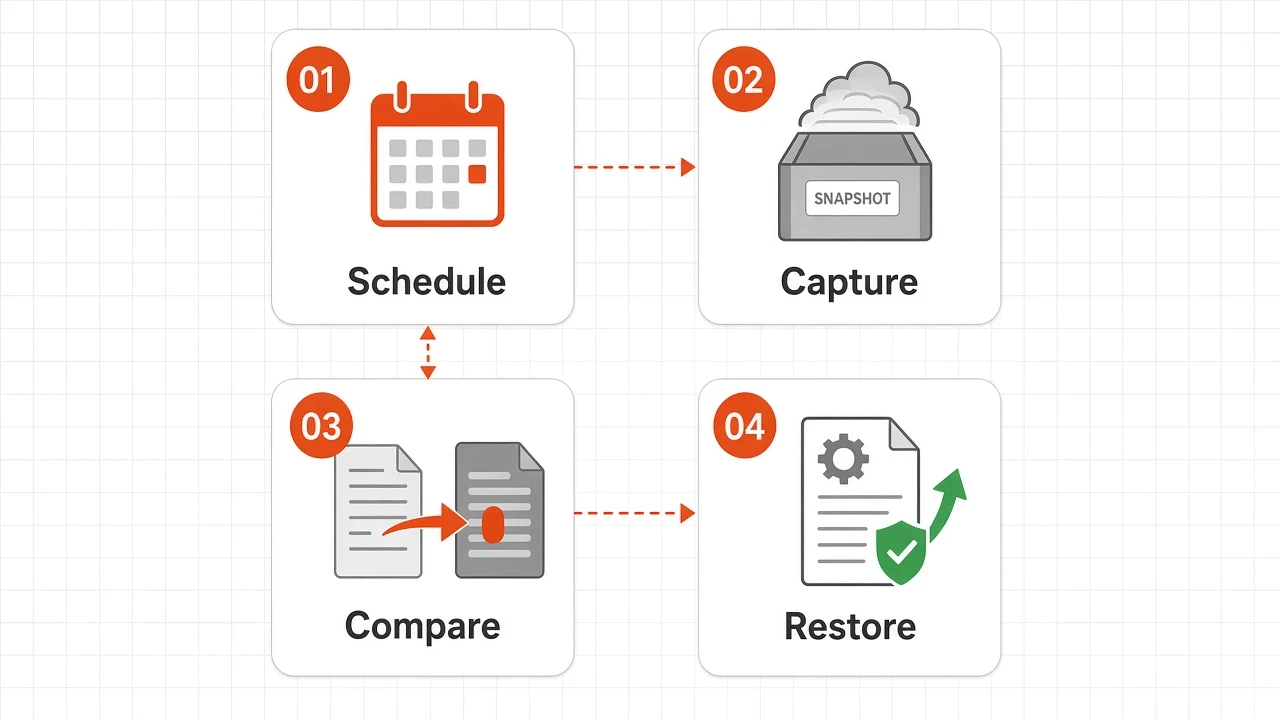
The same four steps whether you edit one GPO or need last week's settings back.
Turn on Group Policy Objects in the backup scope. Install the Group Policy Management feature on the server running the backup; the console tells you if it is missing.
Every backup takes a GPMC backup of every GPO in scope, with the links it had.
Open a backup's GPOs tab, or compare two backups, to see which GPOs were added, removed or changed.
Pick a GPO, choose settings only or settings plus links, and restore it from the backup you choose.
Everything for Group Policy, in the console you already use for AD backups.

GPOs use the same schedule, retention and snapshots as users, groups and OUs. No Backup-GPO script to write or maintain.

Each GPO in a backup records its version number, so you can see when a policy changed.

In incremental backups, each GPO is marked added, modified, unchanged or deleted compared with the previous backup.

The OUs, domains and sites a GPO was linked to are recorded with every backup.

Restore a single GPO from any backup. If it exists, it is overwritten with the backed-up settings. If it was deleted, it is recreated with its original GUID.

Viewing GPO backups and restoring them are separate permissions, and every GPO restore, success or failure, is written to the audit log.
Turn on Group Policy Objects in the backup scope and they join the same full and incremental snapshots as your other objects. Each run captures GPOs with the rest of the directory.
Compare two backups for Group Policy Objects. Counts show what was added, removed or modified, and a modified GPO shows its version number before and after.
Pick a GPO and choose settings only, or settings plus links. Settings overwrite the live GPO, or recreate it with its original GUID if it was deleted. Links re-apply the OU, domain and site links recorded in that backup.
Viewing GPO backups and restoring them are separate permissions, and every GPO restore, success or failure, is written to the audit log.
Three ways a GPO goes wrong, and how recovery goes.

An admin changed the wrong GPO while fixing a mapped drive.

A GPO that looked unused was deleted during a tidy-up.

A policy stopped applying after an OU restructure.
Three common cases and the option for each.
Situation
What happens
What you get
Restore overwrites the live GPO with the backed-up settings.
The same GPO, with the settings from the backup you chose.
It is recreated with its original GUID from the backup you choose.
The GPO is back under the same GUID, ready to link again.
Choose settings plus links. Links are re-applied to the OUs, domains and sites recorded at backup.
The policy applies in the same places it did when that backup ran.
Turn on Group Policy Objects in the backup scope. They use the same full and incremental schedule, retention and snapshots as users, groups and OUs. No Backup-GPO script to write or maintain.
Yes. Restore a single GPO from any backup. If it exists, it is overwritten with the backed-up settings. If it was deleted, it is recreated with its original GUID.
Choose settings plus links and the OUs, domains and sites recorded with that backup are re-applied. Settings only leaves the current links in place.
Yes. Compare two backups, or open a backup's GPOs tab. In incremental backups each GPO is marked added, modified, unchanged or deleted compared with the previous backup, and a modified GPO shows its version number before and after.
Yes. GPOs use the same schedule, retention and snapshots as users, groups and OUs. Turn the Group Policy Objects switch on in the backup settings.
Viewing GPO backups and restoring them are separate permissions, and every GPO restore, success or failure, is written to the audit log.