Hello there!
Need Help? We are right here!

Need Help? We are right here!
Search Results:
×Integrate miniOrange with your Security Information and Event Management (SIEM) platform to collect and forward IAM, SSO, MFA, authentication, and security audit logs for centralized monitoring and analysis. SIEM integration allows security teams to capture and deliver identity-related events to cloud-based or on-premise SIEM platforms in near real time.
miniOrange supports SIEM integrations with platforms such as Splunk, Sumo Logic, and FortiSIEM. You can control the security data sent to your SIEM through:
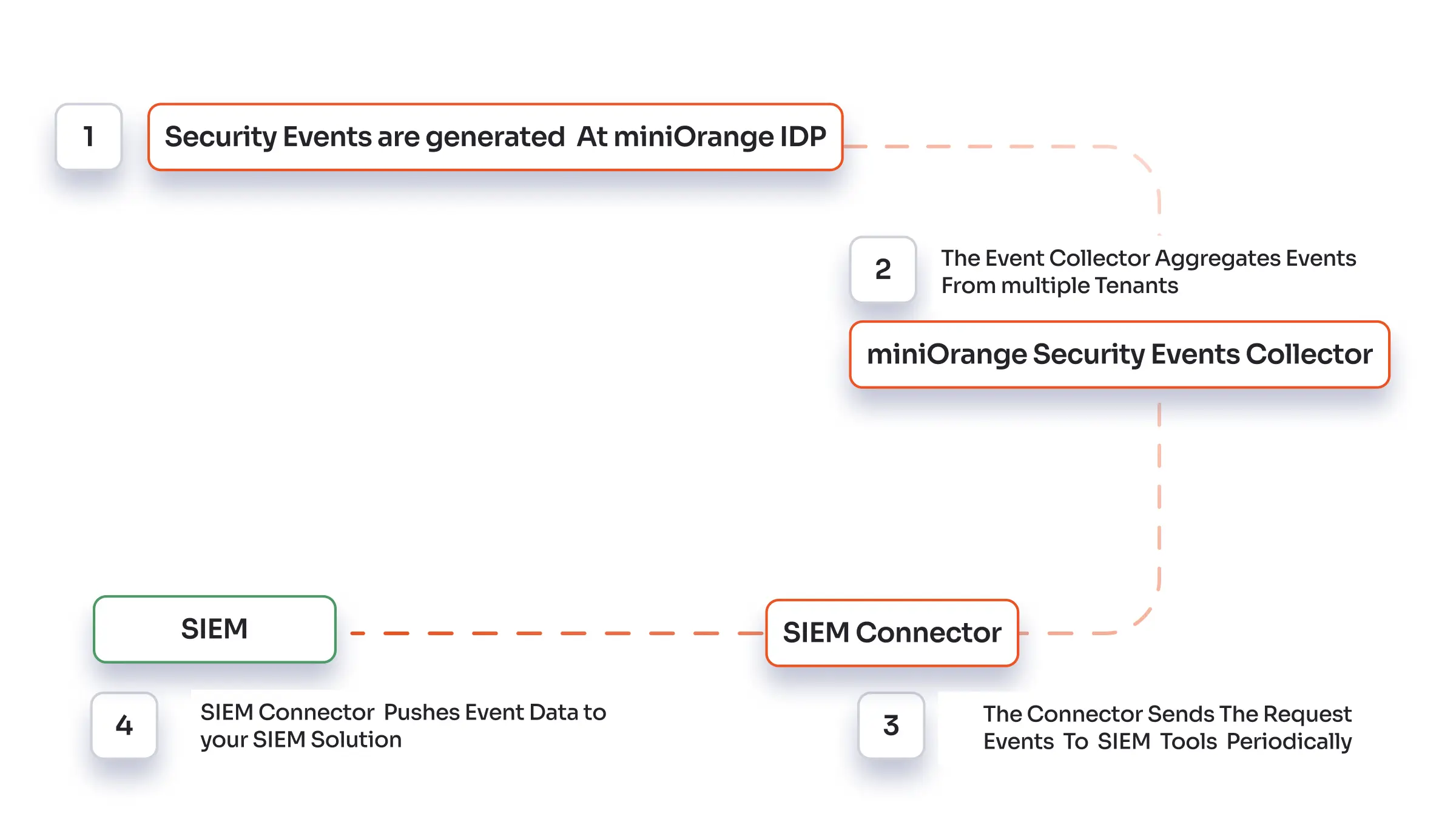
SIEM integration collects security and audit events generated by the miniOrange Identity Platform and forwards them to your SIEM for centralized monitoring and analysis.
miniOrange supports two methods for SIEM log forwarding:
We currently support the JSON format.
      {
  "audit": {
	"logId": "79804b38-3c70-11f0-ab78-06260491ad45",
	"customerId": 123456,
	"actor": {
  	"identifier": "a@gmail.com",
  	"type": "END_USER",
  	"displayName": "a d",
  	"customerId": 123456
	},
	"target": {
  	"identifier": "a@gmail.com",
  	"type": "END_USER",
  	"displayName": "a d",
  	"customerId":123456
	},
	"eventType": "Update Users Phone or Email.",
	"eventDescription": "User has updated Phone or Email.",
	"status": "SUCCESS",
	"displayMessage": "User has updated EMAIL.",
	"clientIp": "127.127.127.127"
  },
  "customerId": 123456,
  "auditKey": "Update Users Phone or Email.",
  "auditValue": "User with username: a@gmail.com has updated EMAIL to: b@gmail.com.",
  "xtraAttributes": "{}"
}
Follow the Step-by-Step Guide given below for SIEM Integration in Cloud & On-premise
Note: Contact miniOrange support to get the whitelisted miniOrange cloud server IPs.
We recommend changing the log level to error-level messages. When log levels are down to a minimum, the server generates large amounts of information in an active production environment. As an alternative, you can set the log level to ERROR and higher so that only important logs are logged. This ensures only important information is sent over to your SIEM tool.
You can even set up a specific log to log only ERROR and higher by modifying the log4j2.xml file. You can find log4j2.xml file here: <path to miniorange directory>\moas\WEB-INF\classes\log4j2.xml.
        <Syslog name="Remote" host="<ip-address>" port="514" protocol="UDP">
            <PatternLayout pattern="${pattern}"/>
        </Syslog>
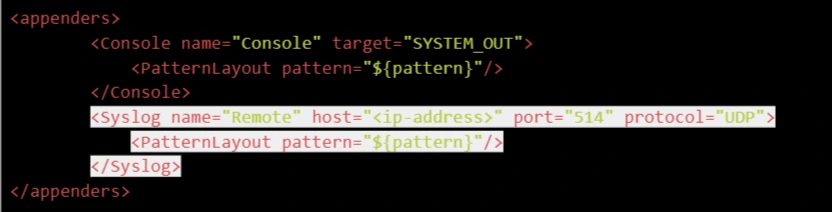
<appender-ref ref="Remote" />
        <asyncLogger name="com.miniorange" level="debug">
            <appender-ref ref="Remote" />
        </asyncLogger>
SIEM integration connects the miniOrange Identity Platform with a Security Information and Event Management (SIEM) platform to forward IAM, SSO, MFA, authentication, and security audit logs for centralized monitoring and analysis.
miniOrange collects security and audit events generated by the Identity Platform and forwards them to your SIEM platform using HTTP or TCP forwarding. This allows security teams to monitor identity-related events and investigate potential security threats from a centralized location.
miniOrange supports SIEM integration with platforms such as Splunk, Sumo Logic, and FortiSIEM. The platform can also forward logs to SIEM solutions that support the available HTTP or TCP forwarding methods.
miniOrange supports HTTP and TCP log forwarding. HTTP forwarding sends security events to an SIEM ingestion API or collector endpoint, while TCP forwarding sends logs to a configured SIEM host and port. TLS can be used to secure TCP log transmission where supported.

