Hello there!

Need Help? We are right here!

Support Icon
miniOrange Email Support
success

Thanks for your Enquiry. Our team will soon reach out to you.

If you don't hear from us within 24 hours, please feel free to send a follow-up email to info@xecurify.com

Search Results:

×

Configure ServiceNow SAML Single Sign-On


miniOrange's ServiceNow Single Sign-On (SSO) solution enables seamless access to your ServiceNow application using a single set of credentials, simplifying the login process across multiple applications. With ServiceNow SSO integration by miniOrange, you can leverage federated identity and connect all your applications, including ServiceNow CRM, using a unified set of credentials. In addition to SSO, miniOrange provides robust IAM features for ServiceNow, empowering organizations to secure access to their ServiceNow instance and efficiently manage user access. Benefit from enhanced security, streamlined user management, and a seamless login experience by implementing miniOrange's ServiceNow SSO solutions and best practices.

With miniOrange ServiceNow SSO, you can:

  • Enhance the user experience by enabling seamless login to ServiceNow without the need for multiple credentials.
  • Effortlessly manage user access through centralized control
  • Integrate smoothly with external identity sources such as Azure AD, ADFS, Cognito, and more

Get Free Installation Help


miniOrange offers free help through a consultation call with our System Engineers to Install or Setup ServiceNow SSO solution in your environment with 30-day free trial.

For this, you need to just send us an email at idpsupport@xecurify.com to book a slot and we'll help you in no time.


Supported SSO Features

miniOrange ServiceNow SAML integration supports the following features:

  • SP Initiated SSO Login: Users can access their ServiceNow account via a URL or bookmark. They will automatically be redirected to the miniOrange portal for login. Once they've signed on, they'll be automatically redirected and logged into ServiceNow.
  • IdP Initiated SSO Login: Users need to login to the miniOrange first , and then click on the ServiceNow icon on the applications dashboard to access ServiceNow.(If you have set up any more Identity Sources, you will log in to that platform).
  • JIT Provisioning: Enables the automatic creation of user accounts in ServiceNow when a person logs in for the first time via Desktop SSO, IDP, or Active Directory (AD) authentication.
  • Single Logout: With this feature, you will be automatically logged out of all the applications that are connected with Identity provider (IdP) when you log out from ServiceNow org or any other app.
  • Mandate users to Login using SSO: Single Sign-on can make it mandatory for all users to log in using SSO. This will prevent any person from login using any other source and bypassing the login system. No person will be able to have direct login making it a streamline and secure process.

Connect with External Source of Users


miniOrange provides user authentication from various external sources, which can be Directories (like ADFS, Microsoft Active Directory, OpenLDAP, AWS etc), Identity Providers (like Microsoft Entra ID, Okta, AWS), and many more. You can configure your existing directory/user store or add users in miniOrange.
Prerequisites

  • Only Workspace Owners can configure SSO
  • It’s only supported in Business+ and Enterprise Grid

Follow the Step-by-Step Guide given below for ServiceNow Single Sign-On (SSO)

1. Configure ServiceNow in miniOrange

  • Login into miniOrange Admin Console.
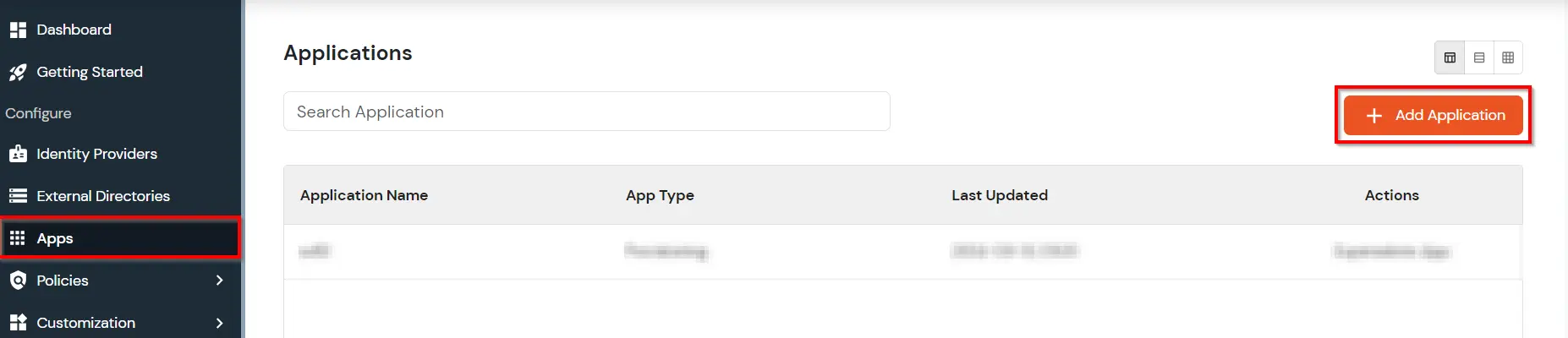
  • Go to Apps and click on Add Application button.
  • ServiceNow Single Sign-On (SSO) add app

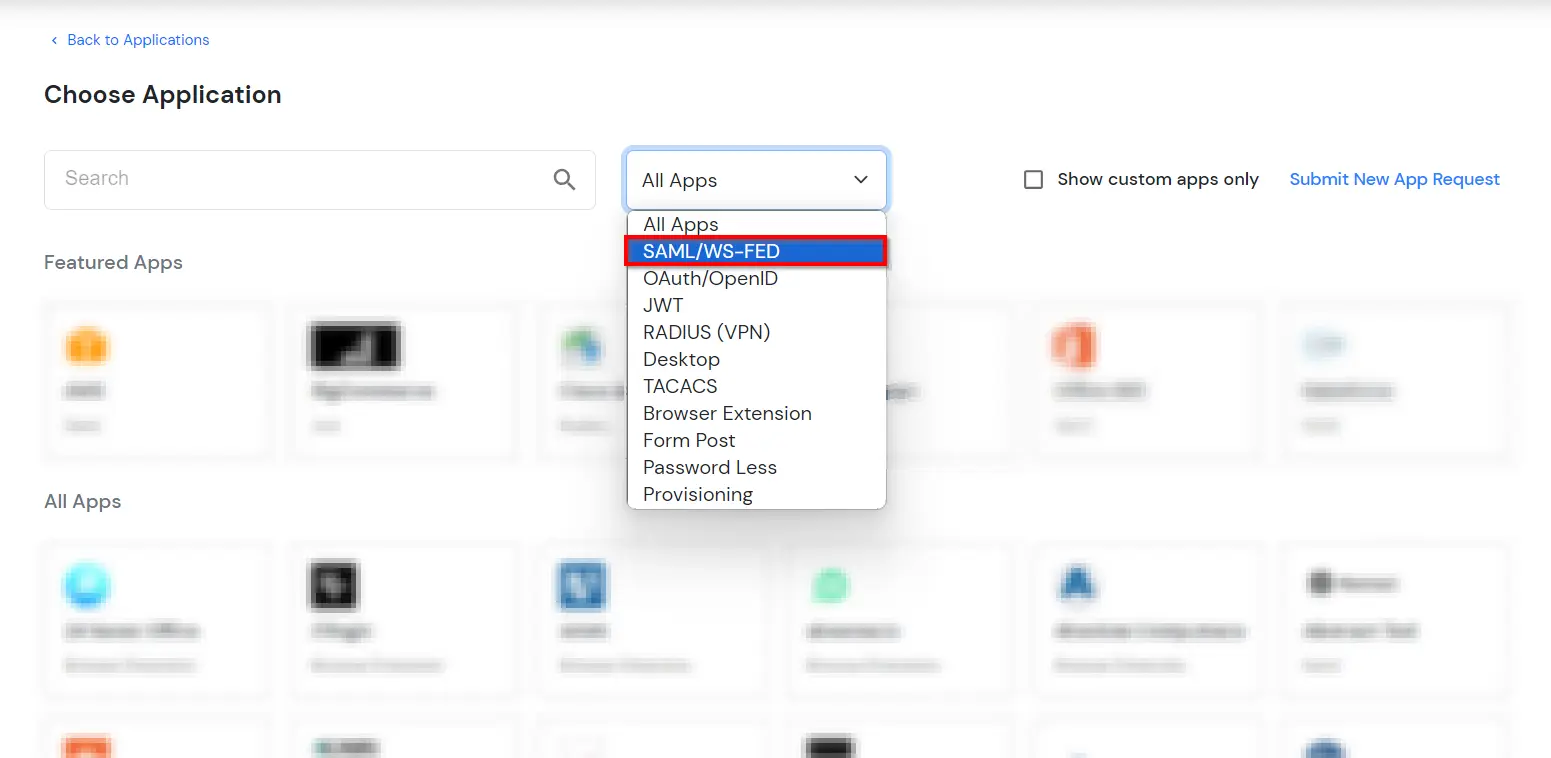
  • In Choose Application Type, select SAML/WS-FED from the All Apps dropdown.
  • ServiceNow Single Sign-On (SSO) choose app type

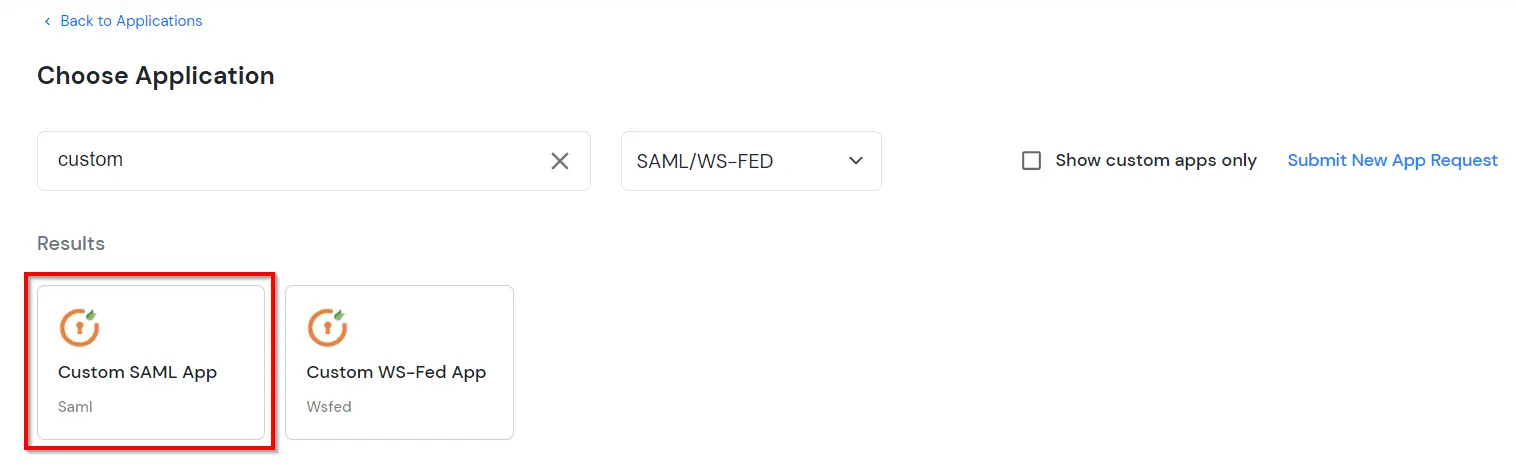
  • Search for ServiceNow in the list, if you don't find ServiceNow in the list then, search for custom and you can set up your application in Custom SAML App.
  • ServiceNow Single Sign-On (SSO) manage apps

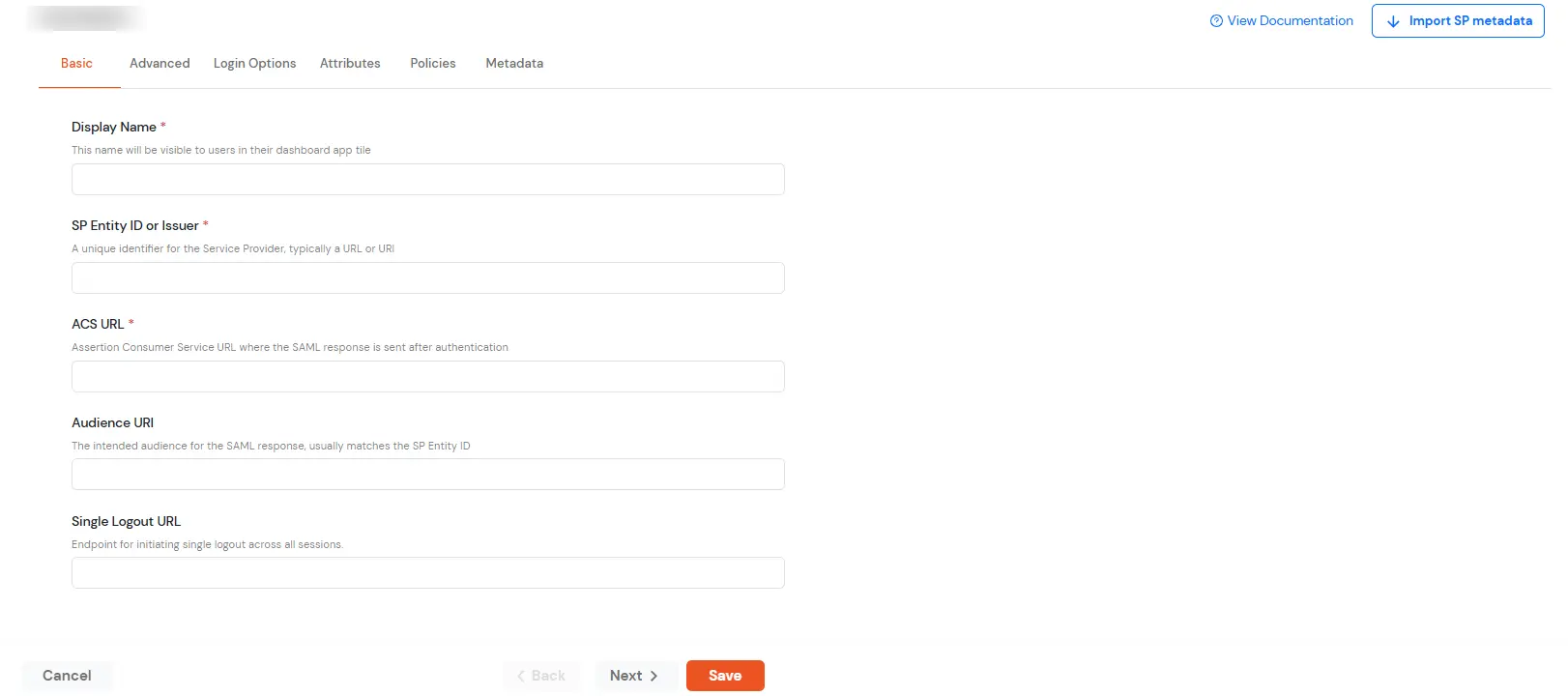
  • In the Basic tab, enter the following details:
    • Enter the Display Name as Servicenow.
    • Get the SP Entity ID or Issuer from the metadata. You will find the value in the first line against entityID.
    • Make sure the ACS URL is in the format: https://[yourdomain].my.servicenow.com/?so=[organization_id].
    Configure ServiceNow SSO applicaton

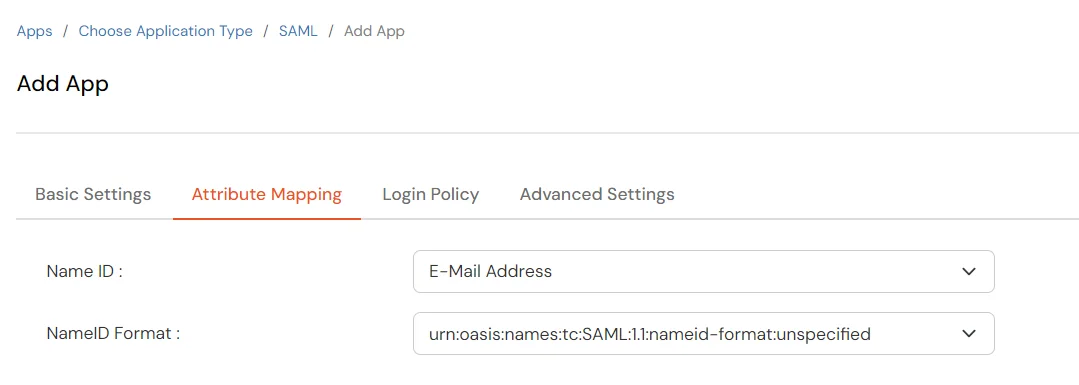
  • Click on Next. In the Attributes tab, configure the following attributes as shown below.
  • Configure ServiceNow SSO: Add Attribute

  • Click on Save to configure ServiceNow.
  • Now go to the Metadata tab.
  • On the Metadata tab, choose one of the following options:
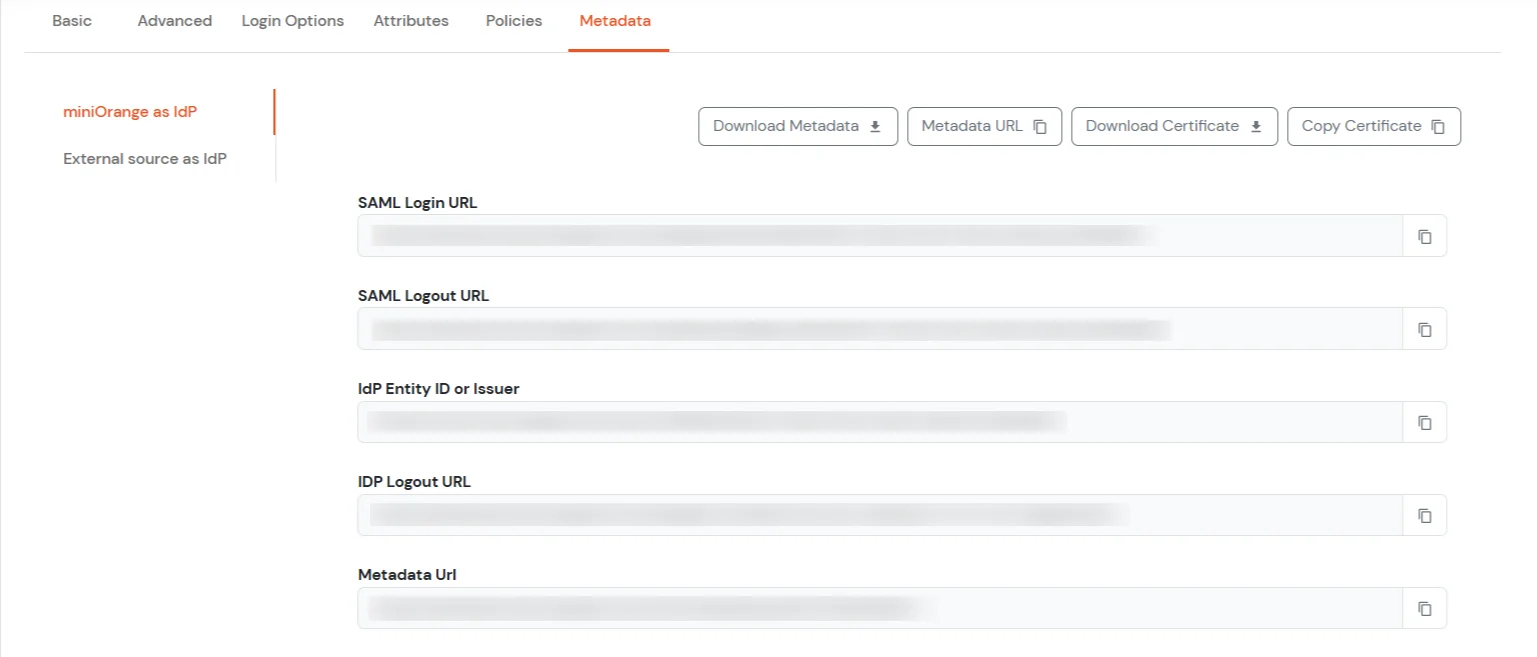
    • If you want to use miniOrange as User-Store (i.e., your employee identities will be stored in miniOrange), download the metadata file under miniOrange as IdP.
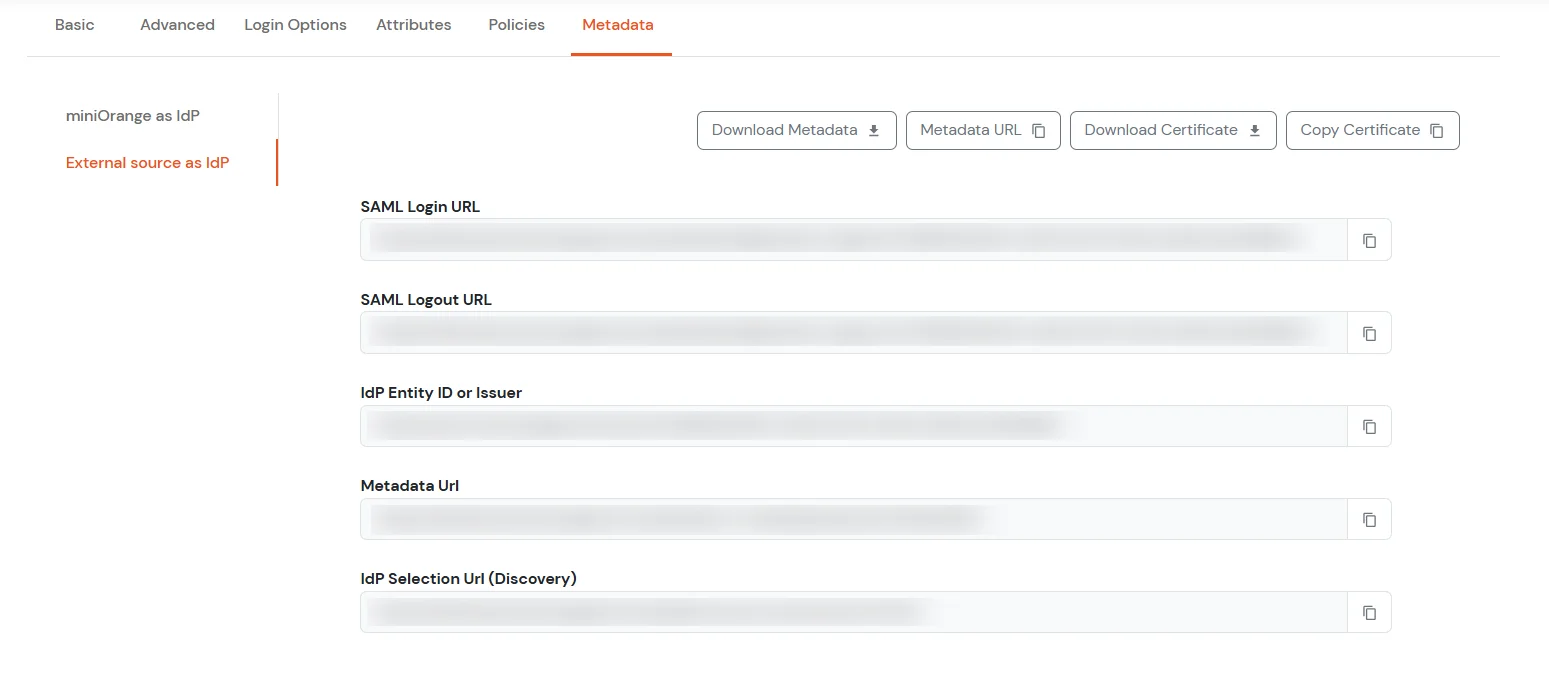
    • If you want to authenticate via an external Identity Provider (IdP) like Active Directory, Okta, OneLogin, Google, or Apple ID, download the metadata file under External source as IdP.
    ServiceNow SSO (Single Sign-On) miniOrange as IdP

    ServiceNow SSO (Single Sign-On) External source as IdP

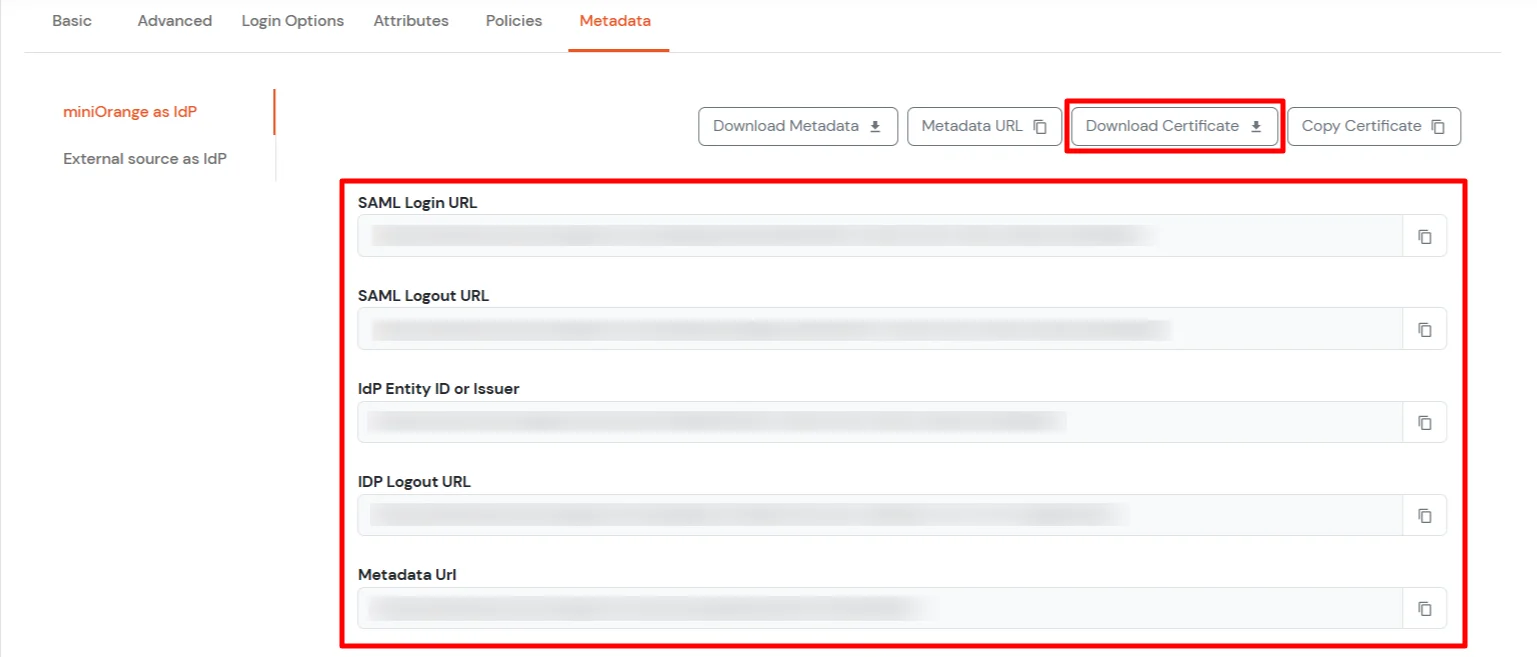
  • Under miniOrange as IdP section, copy the Metadata Url and keep the file handy. You will require this in Step3.
  • ServiceNow Single Sign-On (SSO) Select Metadata details external IDP or miniOrange as IDP

2. Configure SAML in Servicenow

  • Login to ServiceNow as the system administrator.
  • Activate the Integration - Multiple Provider Single Sign-On Installer plugin by doing the following:
    • Search for plugins in the Filter navigator (top left input field).
    • Search for Integration - Multiple Provider Single Sign-On Installer from the search bar at the top of the Plugins page:
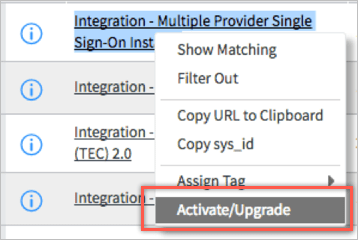
    • Right-click on the correct plugin, then select Activate/Upgrade:
    • ServiceNow Single Sign-on: admin login

    • This completes the installation of the Multiple Provider Single Sign-On plugin, allowing you to now configure Single Sign-On settings within ServiceNow.
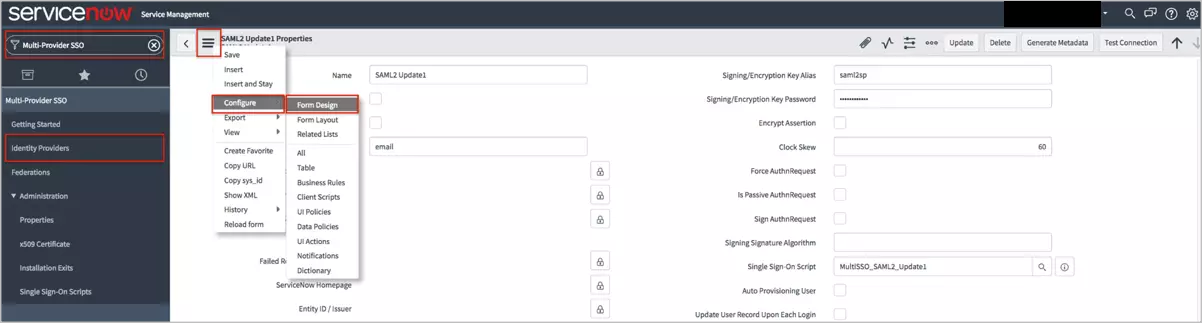
  • Search for Multi-Provider SSO in the Filter navigator (top left input field). Select Identity Providers.
  • Click the SAML2 Update1 > Name. Select Configure > Form Design from the Additional actions menu.
  • ServiceNow SSO Integration: configuration

  • The new Form Design tab should appear. Set the Sign LogoutRequest field after Sign AuthnRequest.
  • Click Save (top right). Close the Form Design tab.

3. Configure Provider in Servicenow

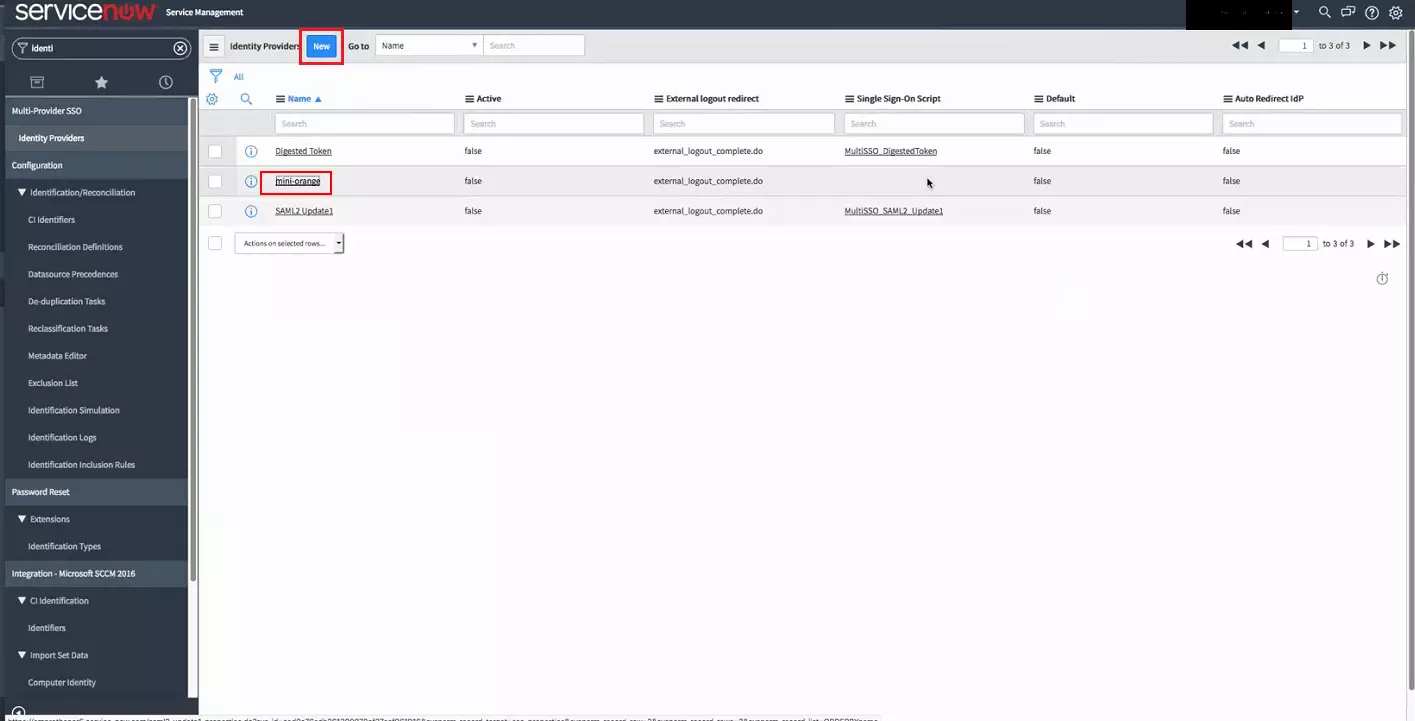
  • Go back to the Identity providers menu. Click New.
  • ServiceNow Single Sign-on: Configure provider step

  • Select the SAML2 Update1 option.
  • ServiceNow Single Sign-on (SSO): select saml 2 update1

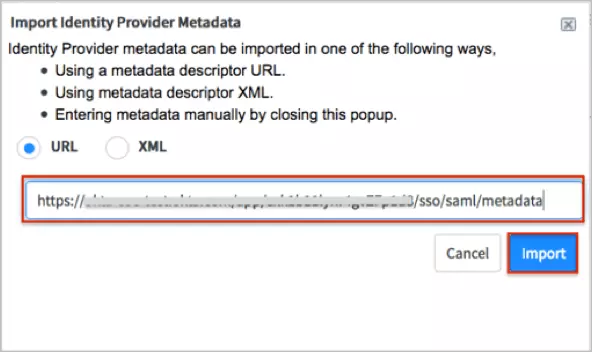
  • An Import Identity Provider Metadata pop-up dialogue appears.
  • Enter the following Metadata URL, sign into the miniOrange Admin dashboard to generate this value. Click Import.
  • ServiceNow SSO: submit metadata url

  • Check Active. Check Default (if you want this SAML configuration to be the default).
  • In the user field, specify the ServiceNow user attributes that you will be matching against miniOrange with SAML. By default, this is user_name, but can be configured to match other attributes such as email, depending on your use-case.
  • Enter the following Identity Provider's SingleLogoutRequest URL: Sign into the miniOrange Admin Dashboard to generate this variable.
  • Change the Protocol Binding for the IDP's SingleLogoutRequest to the following: urn:oasis:names:tc:SAML:2.0:bindings:HTTP-POST
  • Check Create AuthnContextClass.
  • Signing/Encryption Key Alias: Enter the alias name you created for the SAML 2.0 Keystore. By default, the integration looks for the alias saml2sp.
  • Signing/Encryption Key Password: Enter the password to your SAML 2.0 Keystore. By default, the password is the same as the default alias name.
  • Check Force AuthnRequest if you want to enable Force AuthnRequest.
  • Check Sign LogoutRequest and Uncheck Auto Provisioning User.
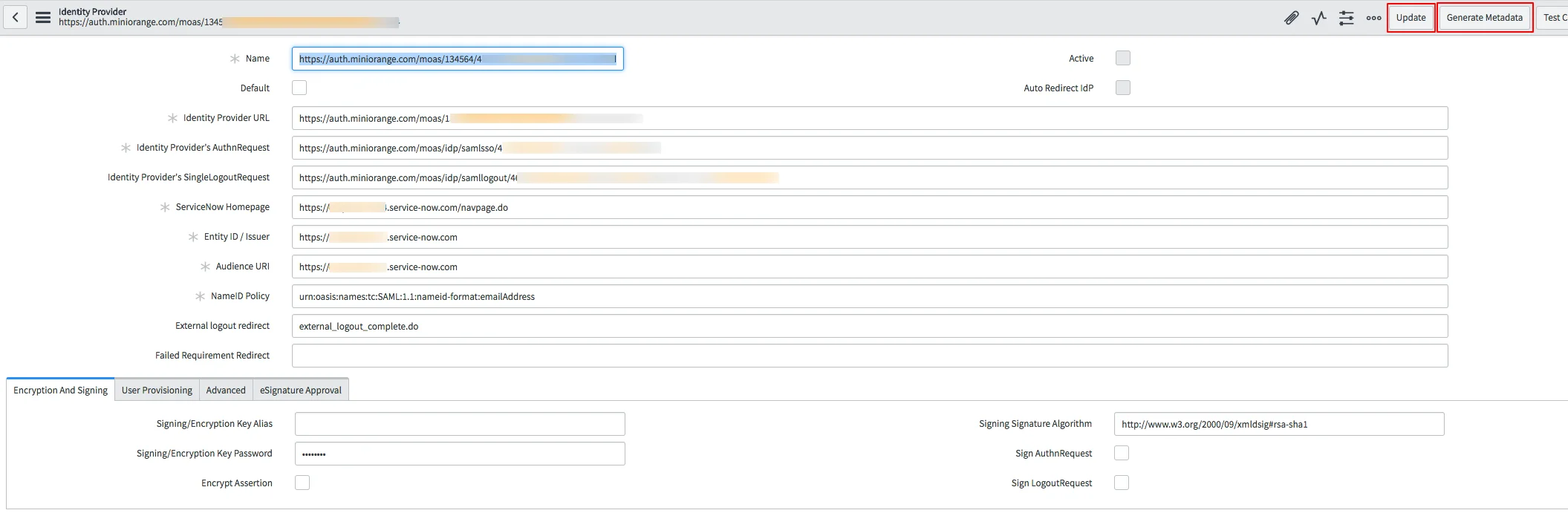
  • Uncheck Update User Record Upon Each Login. Your settings should look like this:
  • ServiceNow SSO: update user record

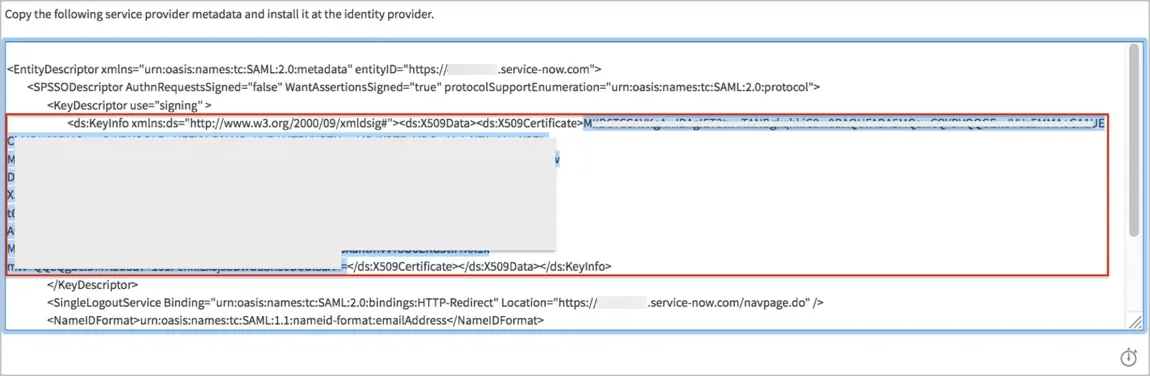
  • Click Update. Click Generate Metadata: The new metadata tab appears.
  • Save the X509Certificate value.
  • ServiceNow SSO Single Sign-on: save certificate value

  • Create a file in a text editor in the following format:
                  -----BEGIN CERTIFICATE-----
                    [your X509Certificate value]
                  -----END CERTIFICATE-----
                  
  • Save the text file as servicenow_slo.cert: and close the metadata tab.
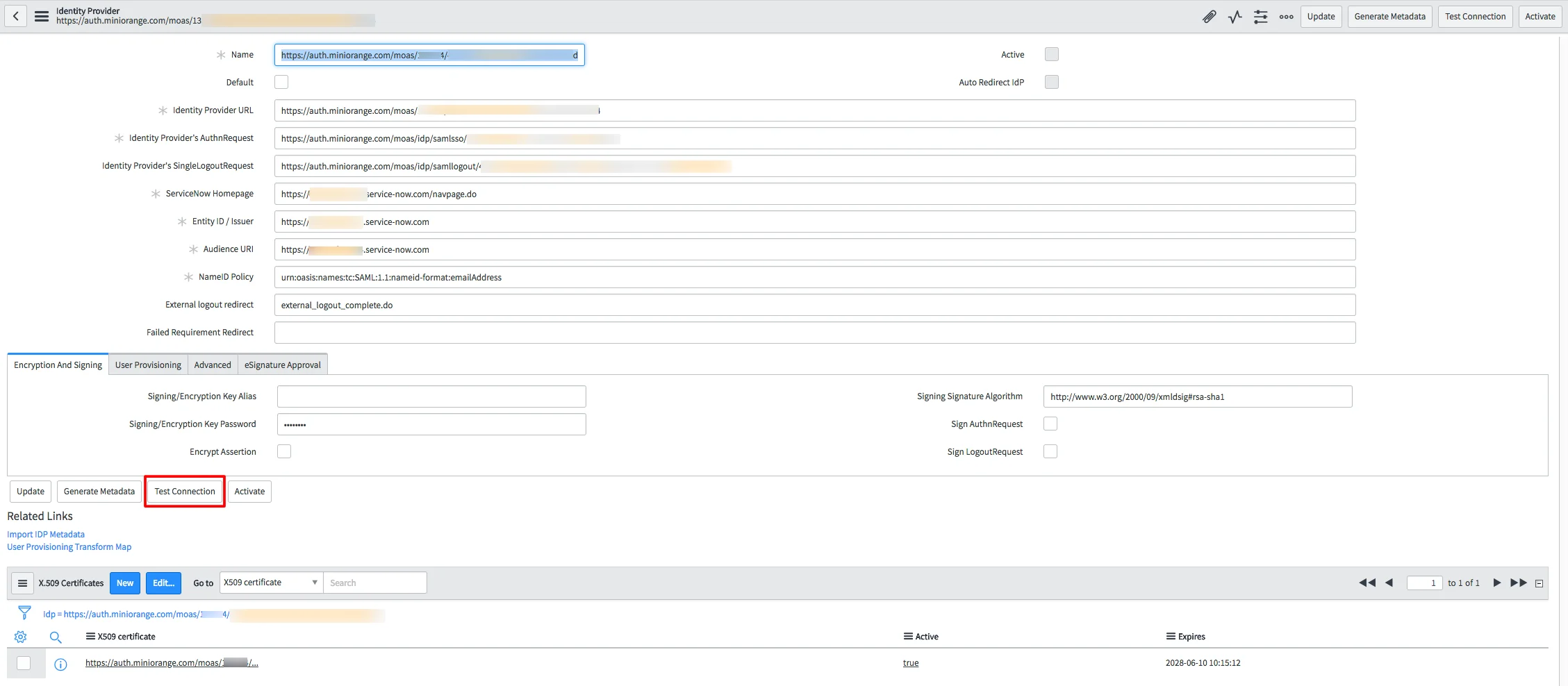
  • Click the Test Connection button in the IDP form above to open a new window.
  • ServiceNow Single Sign-On (SSO) : Click on Test Connection

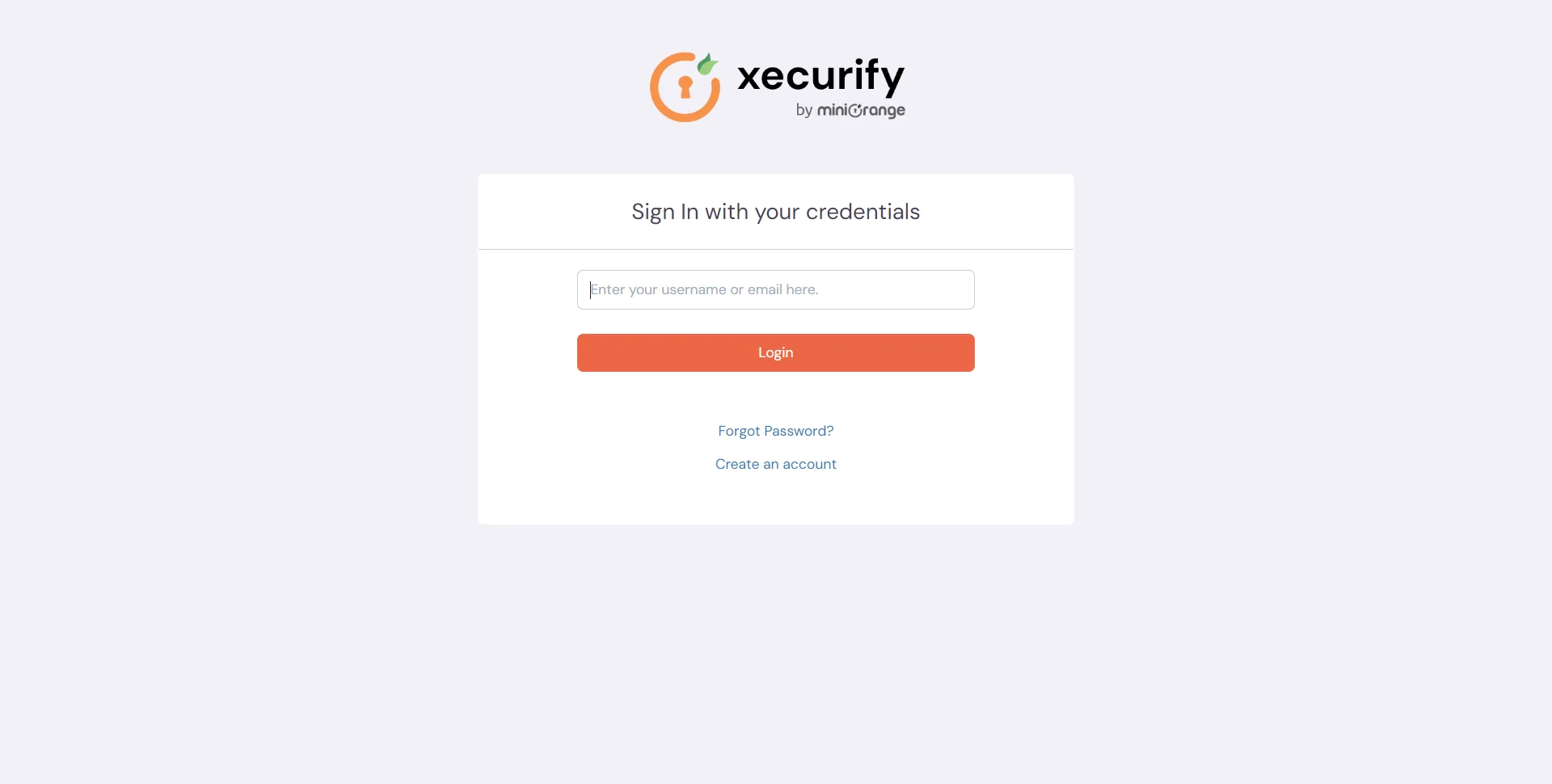
  • Now, enter your miniOrange login credential and click on Login.
  • ServiceNow Single Sign-On (SSO)

  • When SSO Test Connection is successful, you see a screen like below.

    Note : It may requires removing Identity Provider's SingleLogoutRequest field value on IdP record for a successful Test Connection like below:
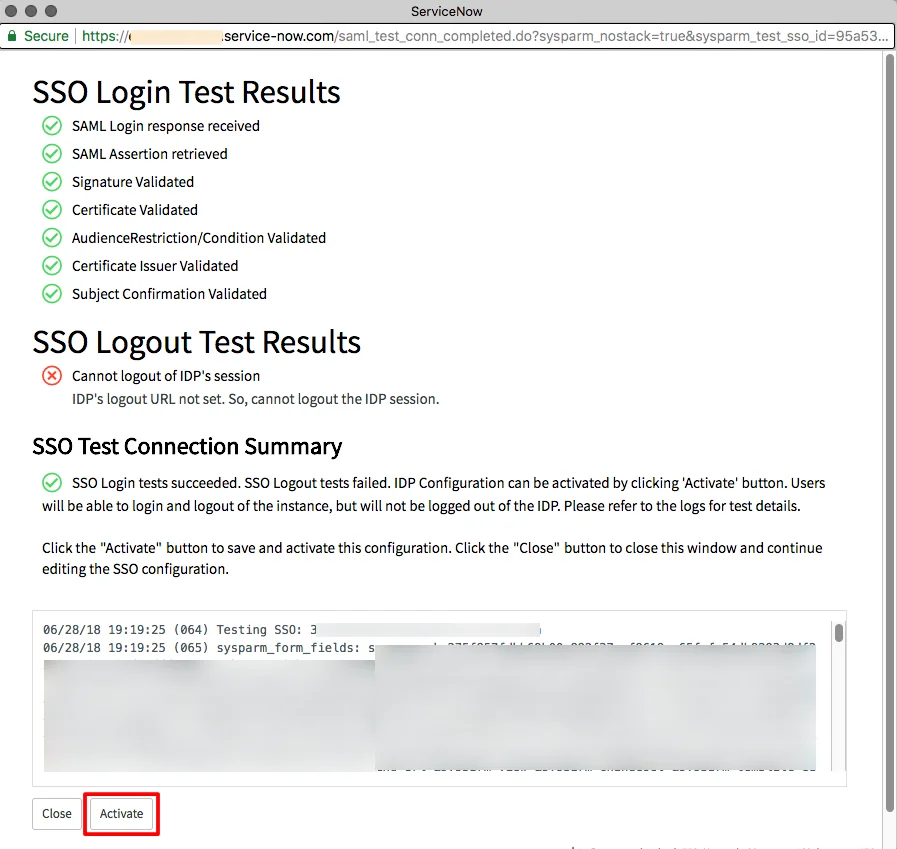
  • ServiceNow Single Sign-on: SSO Login Test Results

  • Click on Activate to activate above IdP.
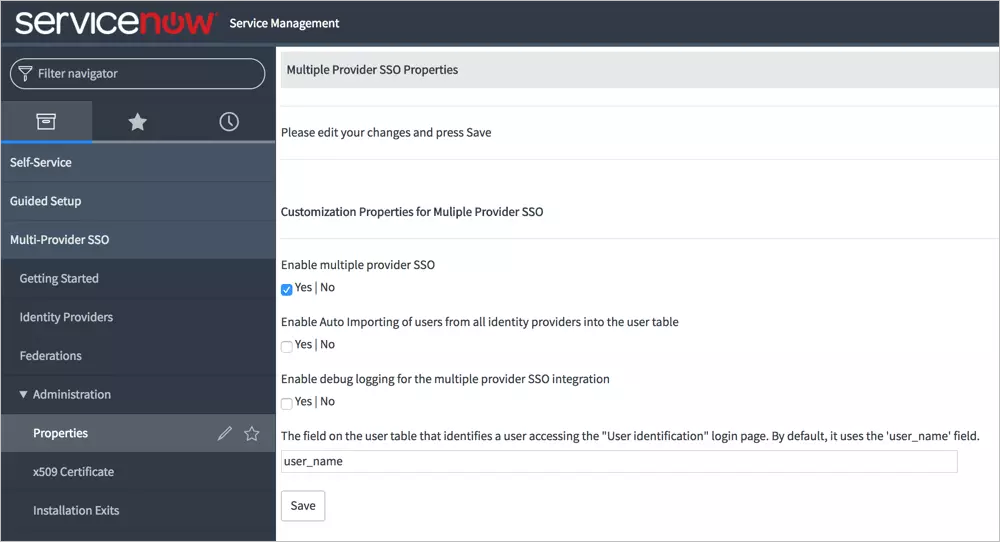
  • Select Properties under Administration from the Multi-Provider SSO sidebar on the left.
  • Check Enable multiple provider SSO.
  • Uncheck Enable Auto Importing of users from all identity providers into the user table. Click Save.
  • ServiceNow Single Sign-on: Uncheck Enable Auto Importing of users

4. Test SSO Configuration

Test SSO login to your ServiceNow account with miniOrange IdP:
    Using SP Initiated Login

    • Go to your ServiceNow URL, here you will be either asked to enter the username or click on the SSO link which will redirect you to miniOrange IdP Sign On Page.
    • ServiceNow Single Sign-On (SSO) login

    • Enter your miniOrange login credential and click on Login. You will be automatically logged in to your ServiceNow account.

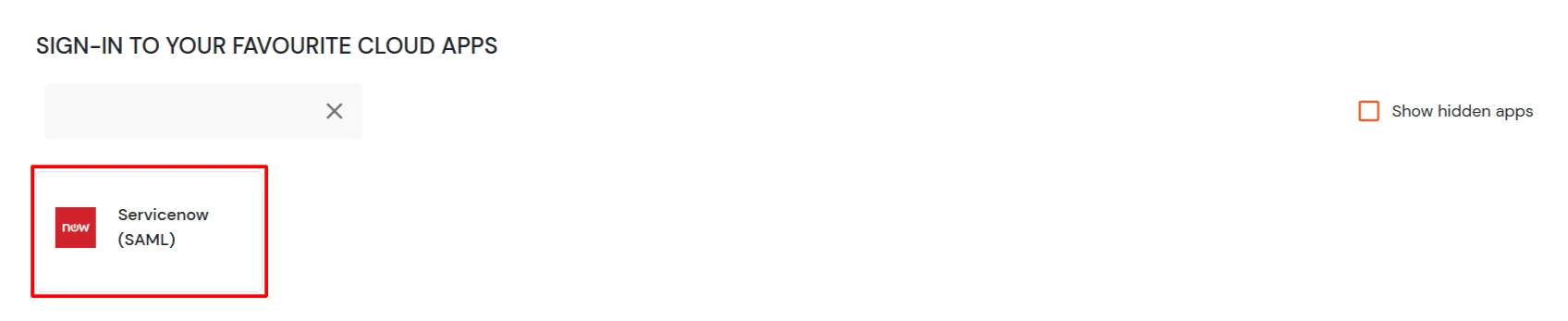
    Using IDP Initiated Login

    • Login to miniOrange IdP using your credentials.
    • ServiceNow Single Sign-On (SSO)

    • On the Dashboard, click on ServiceNow application which you have added, to verify SSO configuration.
    • ServiceNow Single Sign-On (SSO) manage apps


    Not able to configure or test SSO?


    Contact us or email us at idpsupport@xecurify.com and we'll help you setting it up in no time.


Frequently Asked Questions


How can miniOrange assist with setting up ServiceNow SSO in an organization?

miniOrange offers a 30-day free trial along with consultation and setup assistance from their system engineers. They provide detailed configuration guides and metadata to help successfully integrate ServiceNow SSO with your identity provider.

Which identity providers and directories are compatible with miniOrange ServiceNow SSO?

The solution supports a broad range, including Active Directory, ADFS, OpenLDAP, Microsoft Entra ID, Okta, AWS, and more.


External References

Want To Schedule A Demo?

Request a Demo


Our Other Identity & Access Management Products