To allow a user or group to reset passwords for normal user accounts within a specific OU, follow these steps:
Apply Delegation at OU Level
Open Active Directory Users and Computers (ADUC).
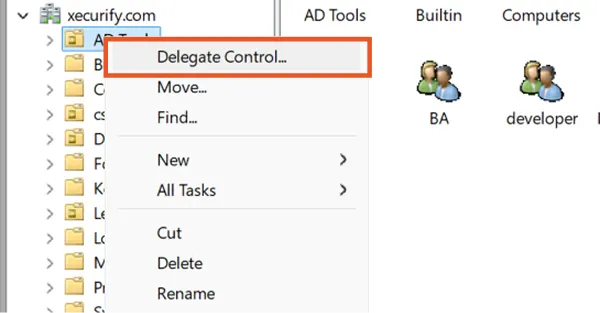
Go to the OU (or Domain container) where the user accounts are located.
Right-click the OU/domain and select Delegate Control.
Click Next.
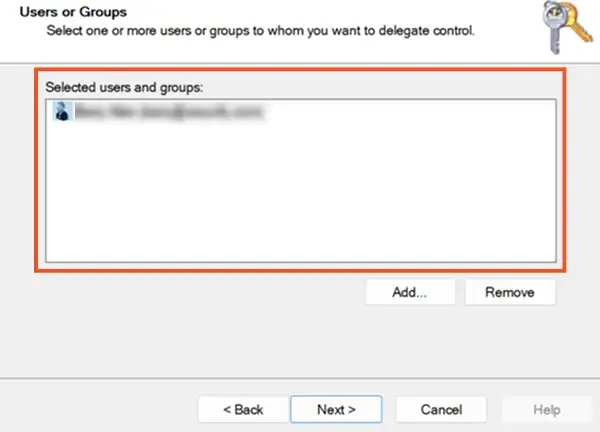
Select the User or Group
Select the user or security group to whom you want to delegate password reset permissions.
Click Next.
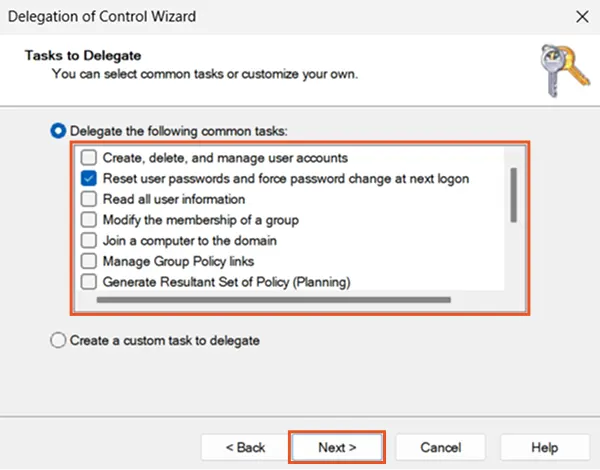
Choose the Reset Password Task
Under Delegate the following common tasks, select:
Reset user passwords and force password change at next logon
Click Next.
Finish Delegation
Review the selections.
Click Finish to complete the delegation setup
Note:
This delegation applies only to normal user accounts within the selected OU.
Password reset for privileged or protected group members (such as Domain Admins, Server Operators, Backup Operators, etc.) is not allowed due to Active Directory security protections (AdminSDHolder).