Hello there!
Need Help? We are right here!

Need Help? We are right here!
Search Results:
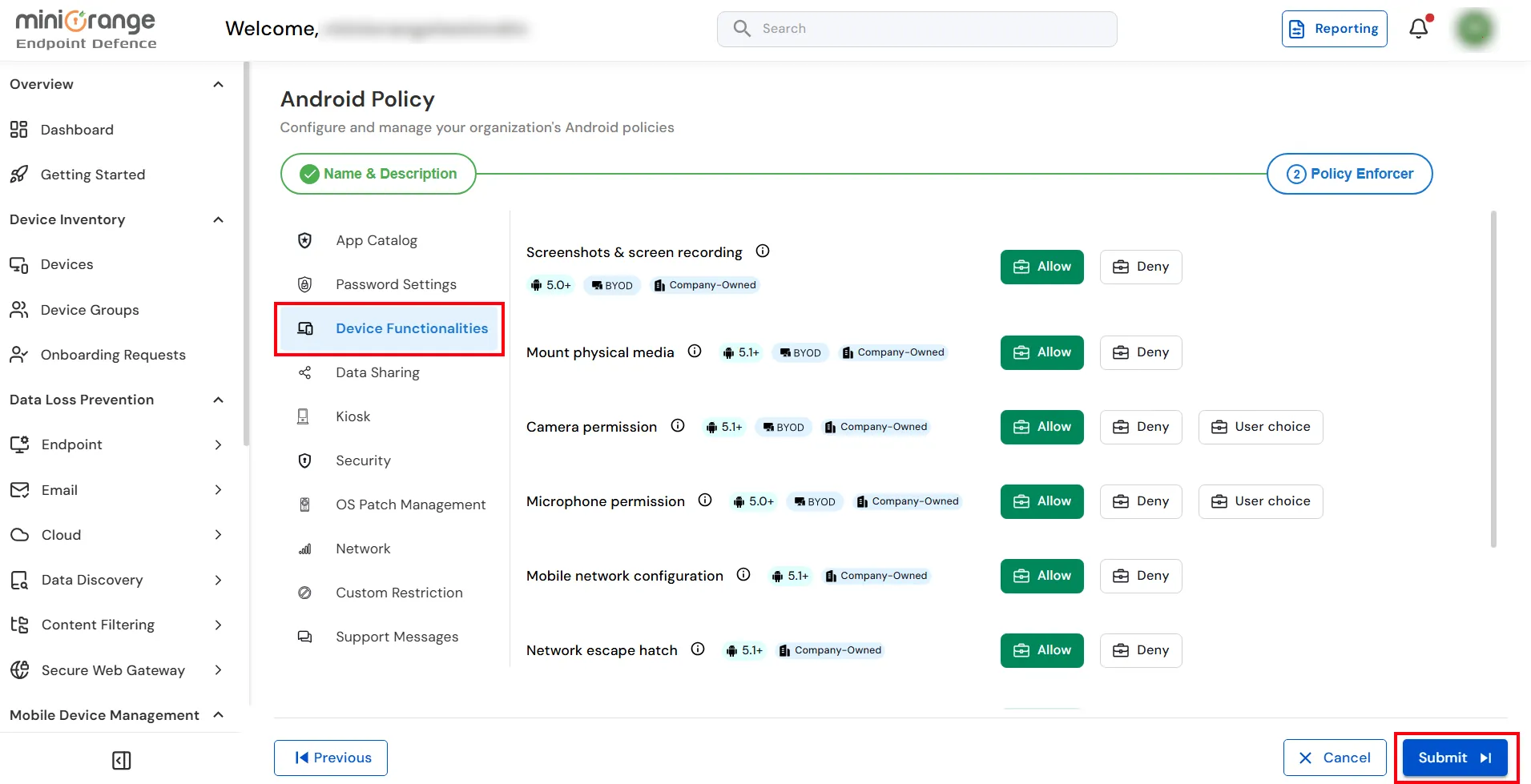
×The Device Functionalities policy allows administrators to control access to various hardware features, system capabilities, and device permissions on managed Android devices. By enabling or restricting these settings, organizations can enhance security, prevent unauthorized device usage, and ensure compliance with corporate policies.
| Setting | Description | Options |
|---|---|---|
| Screenshots & Screen Recording | Controls whether users can capture screenshots and record the device screen. |
Allow: Enables screenshots and screen recording. Deny: Prevents screenshots and screen recording. |
| Mount Physical Media | Controls whether external storage devices, such as SD cards or USB storage, can be mounted on the device. |
Allow: Permits mounting of external storage. Deny: Blocks mounting of external storage. |
| Camera Permission | Controls whether applications can access the device camera. |
Allow: Grants camera access. Deny: Blocks camera access. User Choice: Allows the user to decide whether to grant camera access. |
| Microphone Permission | Controls whether applications can access the device microphone. |
Allow: Grants microphone access. Deny: Blocks microphone access. User Choice: Allows the user to decide whether to grant microphone access. |
| Mobile Network Configuration | Controls whether users can modify mobile network settings. |
Allow: Users can change mobile network settings. Deny: Users cannot modify mobile network settings. |
| Network Escape Hatch | Manages a temporary network connection to refresh policies and avoid permanent device lockouts while in kiosk mode. |
Allow: Permits temporary bypass of network restrictions. Deny: Prevents bypassing network restrictions. |
| Data Roaming Settings | Controls whether mobile data can be used while roaming. |
Allow: Enables data roaming. Deny: Disables data roaming. |
| Cell Broadcast Configuration | Controls whether users can modify cell broadcast and emergency alert settings. |
Allow: Users can configure cell broadcast settings. Deny: Users cannot modify cell broadcast settings. |
| Device Location Permission | Controls whether applications can access the device location. |
Allow: Grants location access. Deny: Blocks location access. User Choice: Allows the user to decide whether to grant location access. |
| Screen Inactivity Timeout | Specifies the duration of inactivity after which the device screen automatically locks. | Select the required timeout value from the available options. |